Creator Workflow
AI Dictation
Voice To Text
YouTube Scripts
Content Writing
Wispr Flow Review For Creators
Wispr Flow: The AI Dictation Tool I Use For Scripts, Emails & Content Creation
A faster way to turn spoken ideas into clean, usable copy for YouTube, blog posts, affiliate pages, client replies and day-to-day creator workflow.
As a photographer, filmmaker and content creator, I spend a surprising amount of time writing. Not always long-form writing, but the practical writing that keeps everything moving: YouTube descriptions, video scripts, affiliate pages, client emails, product review notes, blog posts, captions, pinned comments and content ideas. Wispr Flow is one of those tools that makes sense because it helps remove the friction between having an idea and getting that idea onto the page.
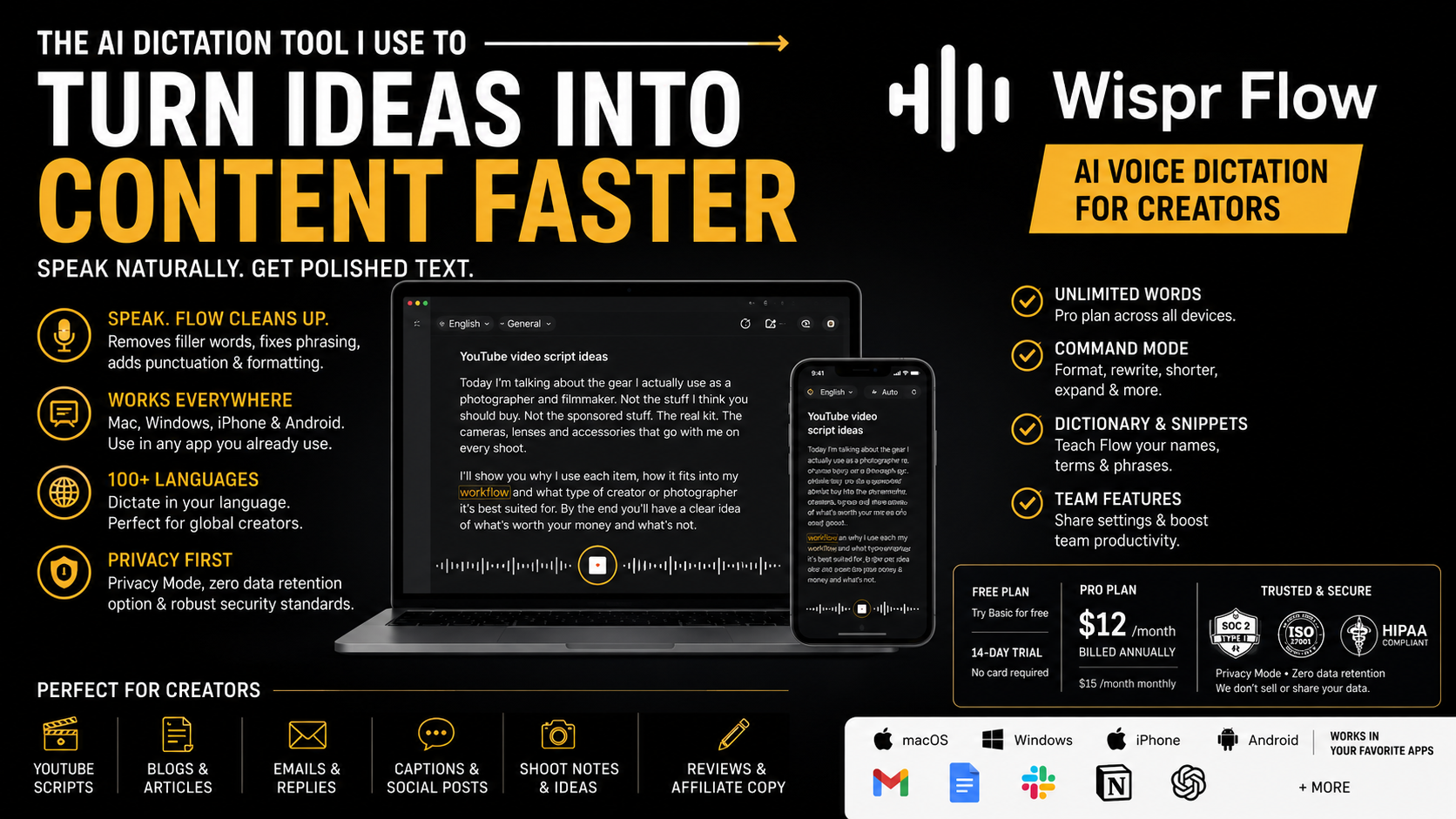
What Is Wispr Flow?
Wispr Flow is an AI voice dictation tool designed to turn natural speech into cleaner written text. You speak your thoughts, and Flow helps convert them into something closer to usable copy. The idea is simple but powerful: instead of typing every sentence manually, you talk naturally and let the software help structure, punctuate and tidy the first version.
This matters because normal dictation can feel very literal. It often gives you the words, but it also gives you the pauses, filler, awkward phrasing and messy structure. Wispr Flow is more useful because it is designed for how people actually speak. It is not just about transcription. It is about getting from a rough spoken thought to something you can realistically edit, publish or send.
For me, the value is not that it replaces writing. It speeds up the first draft. That is the difficult part for many creators. Once the rough structure exists, it is much easier to shape, edit and refine. Wispr Flow helps create that starting point faster.
Why It Fits My Work
My work now sits across photography, filmmaking, YouTube education, software tutorials, affiliate content, travel stories and gear reviews. Every one of those areas creates a writing task. A video needs a title, description, thumbnail text, pinned comment and short-form captions. A product review needs notes, structure, practical observations and affiliate copy. A website page needs an introduction, workflow context, CTA copy, FAQs and search-friendly wording.
That is a lot of typing. More importantly, it is a lot of starting. Starting is often the slowest part. I might already know what I think about a product or tool, but getting the first version onto the page can become the bottleneck. Wispr Flow helps because I can speak the idea first, while it still feels fresh, then edit it into my own voice afterwards.
For me, Wispr Flow is about removing the gap between thinking of something useful and turning it into publishable content.
That makes it a natural fit for a creator workflow. It is not about producing generic AI copy. It is about capturing real thoughts faster and then shaping them properly.
How I Would Use Wispr Flow As A Photographer And Filmmaker
The most obvious use is script writing. If I am making a tutorial about photo editing, camera gear, filmmaking workflow or software, I can speak through the idea first. I can explain what the video is about, who it helps, what problem it solves, what I want to show and what the viewer should understand by the end. That spoken outline can then become a video script, a YouTube description and a blog post.
It also works well for product reviews. When I am testing a camera bag, software tool, editing app or creator accessory, my best thoughts often happen while using it, not while sitting formally at a desk. Being able to speak those thoughts quickly makes the review process easier. I can capture what I noticed, what surprised me, what I liked, what I would change and who the product is really for.
For brand emails, it can help draft replies faster. I often need to respond to affiliate managers, PR teams, collaborators and potential clients. A quick spoken draft can become a polished email with much less friction. The same applies to pitch ideas, follow-ups, content proposals and quick admin messages.
YouTube Scripts
Speak through a video idea, then turn it into a cleaner script, intro, outline or short-form voiceover.
Affiliate Pages
Capture real product thoughts quickly before refining them into useful, search-friendly website copy.
Brand Emails
Draft replies, pitches and follow-ups more naturally without staring at a blank screen.
Review Notes
Record practical observations while testing products, editing software or creator tools.
Looking For A Wispr Flow Promo, Deal Or Free Trial?
I do not currently have a separate Wispr Flow discount code to share. The best way to check the latest Wispr Flow pricing, free trial, promotional offer, deal or current plan information is to visit the official Wispr Flow website through the links on this page.
Why Voice Can Be Better Than Typing
Typing is excellent for editing. Speaking is often better for getting the idea out. That difference is important. A lot of creative work gets stuck because we try to write the finished version too early. We sit at the keyboard and start judging the sentence before the idea has even had a chance to exist.
When I speak, I tend to explain things more naturally. That is useful for tutorials, reviews and educational content because the page or video should feel like a real person explaining something clearly. The first spoken version may be rough, but it often contains the human part of the idea: the reason the tool matters, the practical use case, the small detail that makes it useful.
Wispr Flow helps preserve that natural thought process while giving me something I can edit. It gives me the raw material faster. Then I can refine the tone, tighten the wording and make sure the final version fits my site.
Where It Fits In A Creator Content System
I would see Wispr Flow as part of a wider creator workflow rather than a single-use app. It sits near the beginning of the process, where ideas are still loose. That might be before filming, during product testing, after a shoot, while planning a tutorial or when trying to turn scattered notes into something more structured.
One spoken note can become several pieces of content. A rough thought about a tool can become a paragraph in a review. That paragraph can become a video section. The video section can become a short-form caption. The caption can become a pinned comment. This is how modern creator businesses work: one good idea can be repurposed, but only if you capture it properly in the first place.
That is where AI dictation software becomes useful. It helps reduce the cost of capturing ideas. Instead of waiting until you have a perfect writing session, you can speak the rough version first and then build from there.
Best Use Cases For Creators
- Drafting YouTube scripts for tutorials, reviews and short-form videos.
- Writing YouTube descriptions, pinned comments and content summaries.
- Turning product review notes into structured website copy.
- Creating blog post outlines from spoken thoughts.
- Drafting emails to brands, clients and affiliate partners.
- Capturing content ideas while travelling, walking or testing products.
- Writing captions for TikTok, Instagram, YouTube Shorts and community posts.
- Building first drafts for workflow pages, software reviews and creator tool recommendations.
What I Like About Wispr Flow
The main thing I like is that it lowers the friction of starting. That is a big deal. Most creators are not short of ideas. They are short of clean systems for capturing and using those ideas. Wispr Flow helps with that first step.
I also like that it suits a more conversational tone. A lot of my content works best when it feels practical and spoken rather than stiff and overproduced. Whether I am explaining a software workflow or talking about a creator tool, I want the copy to feel useful and human. Dictation helps because the first version comes from speech rather than from trying to craft the perfect written sentence immediately.
It is also useful because creative work is not always desk-based. Ideas happen while walking, travelling, editing, filming, testing gear or thinking through a project. A voice-first writing tool makes sense when your work is mobile and your ideas do not always arrive at convenient times.
What To Be Aware Of
No tool should be treated as magic. Wispr Flow can help create faster first drafts, but I would still edit everything before publishing or sending it. The final judgement still needs to come from you. That is especially true for brand communication, published reviews and website pages where tone and accuracy matter.
I would also be sensible with sensitive information. With any cloud-based dictation or AI tool, I would avoid speaking passwords, private client information, confidential contracts, financial details or anything that should not be processed externally unless I fully understand the privacy settings.
Used in the right way, though, Wispr Flow can be a strong productivity tool. I see it as a way to speed up drafting, not replace thinking.
Who Should Try It?
Wispr Flow makes the most sense for people who create a lot of written material around their work. If you are a photographer, filmmaker, YouTuber, educator, blogger, affiliate creator or freelancer, you probably write more than you realise. Scripts, proposals, posts, captions, emails and website pages are all part of the job now.
If you think better out loud, it could be especially useful. Some people organise ideas through typing. Others organise ideas by talking. I am often in the second group, especially when explaining a workflow or talking through why something is useful. Wispr Flow gives that spoken thinking somewhere to go.
Good Fit
Creators, photographers, filmmakers, educators, bloggers, YouTubers, freelancers and affiliate marketers.
Less Essential
People who rarely write, prefer typing everything manually, or need fully offline dictation for sensitive work.
My Honest Take
Wispr Flow is useful because it solves a real creator problem: getting ideas out of your head and into a form you can use. It will not replace your judgement, taste or editing. But it can help you move faster, especially if your work involves tutorials, reviews, emails, blog posts, product pages and content planning.
For me, that makes it a strong workflow tool rather than just another AI app. It helps with the first draft. It helps with momentum. And for creators, momentum is often what makes the difference between an idea staying in your head and becoming something published.
Wispr Flow FAQ
What is Wispr Flow?
Wispr Flow is an AI dictation and voice-to-text tool that helps turn spoken ideas into cleaner written text for scripts, emails, notes, articles and everyday writing.
Is Wispr Flow good for creators?
Yes. It is especially useful for creators who regularly write scripts, video descriptions, blog posts, captions, emails, affiliate content and product review notes.
Do you have a Wispr Flow discount code?
I do not currently have a separate Wispr Flow discount code. The best way to check the latest Wispr Flow pricing, free trial, promo or current offer is to visit Wispr Flow using the links on this page.
Can photographers and filmmakers use Wispr Flow?
Yes. Photographers and filmmakers can use it for shoot notes, edit notes, client emails, scripts, production ideas, blog posts and educational content.
Does Wispr Flow replace writing?
No. I see it as a tool for creating faster first drafts. The final copy still needs editing, personal judgement and a human voice.
Is Wispr Flow useful for YouTube scripts?
Yes. It can help you talk through a video idea, build a rough outline and then refine that into a more polished script, description or short-form voiceover.
This page contains affiliate links. If you visit Wispr Flow through one of the links on this page and decide to purchase, I may earn a commission at no extra cost to you. I only feature tools that make sense for my photography, filmmaking, creator workflow and educational content.
SS-WF-004 / v2.0

