Color Precision × DxO PhotoLab

Film character.
Without changing cameras.

Color Precision brings detailed Kodak and Fujifilm film emulations directly into my DxO PhotoLab workflow — giving me a far more enjoyable way to shape RAW photographs from cameras such as my Sony RX100 VII.

Get 15% Off Try The Free Demo
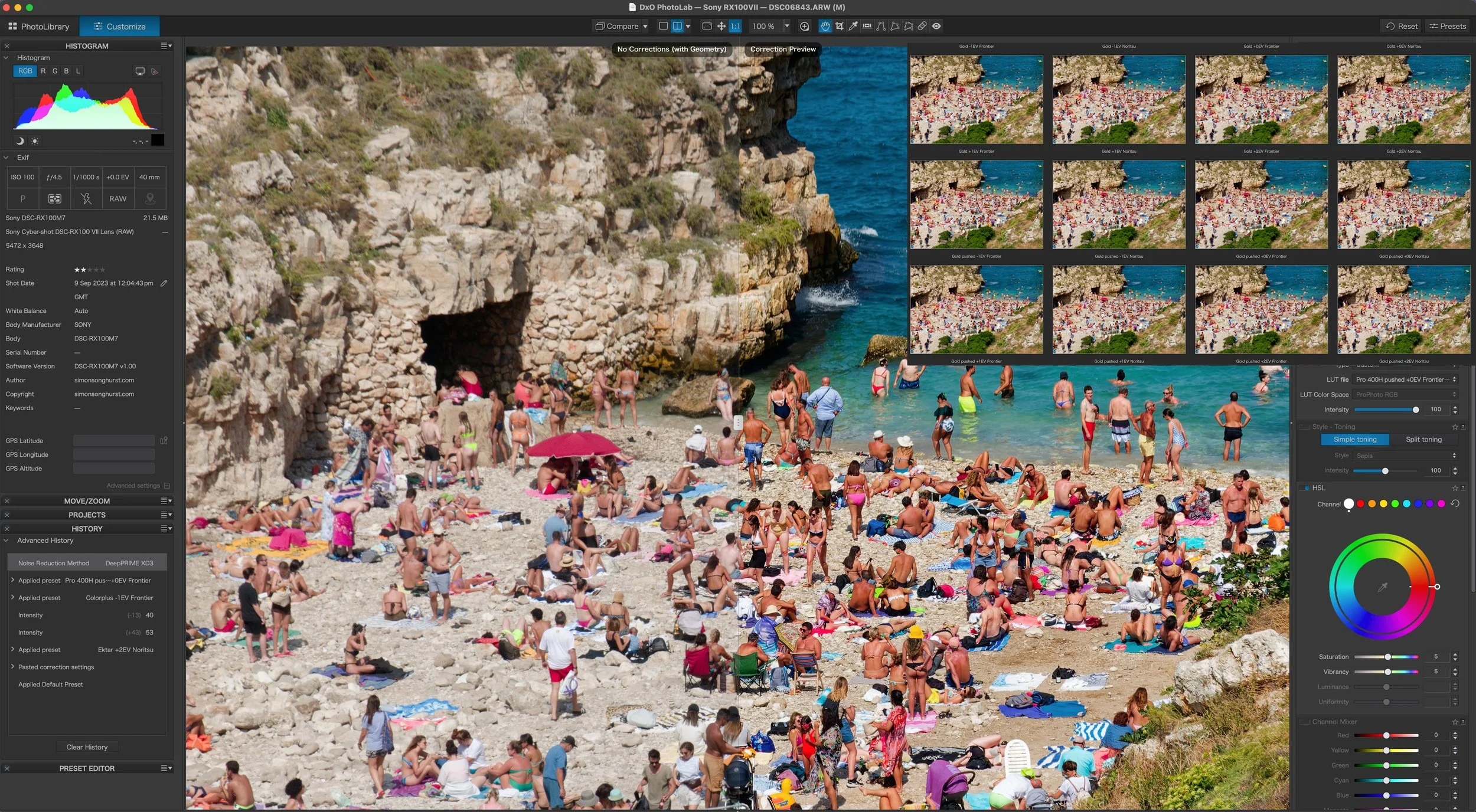
Sony RX100 VII photograph edited using Color Precision in DxO PhotoLab
Sony RX100 VII + Color Precision An example from my own photography workflow, edited using Color Precision inside DxO PhotoLab.
My photograph
15% OFF
Save 15% on Color Precision. Use my exclusive discount code at checkout.
Discount code
Real film references
Emulations developed around real film scanning and profiling rather than generic styling.
Built for DxO
Bring film-inspired creative choices directly into your DxO PhotoLab RAW workflow.
Kodak + Fujifilm
19 film stocks across both collections — colour negative and transparency interpretations.
15% discount
Use SIMONSONGHURST when purchasing Color Precision.
My Sony workflow

This is where Color Precision becomes particularly useful.

Fujifilm has built a huge part of its photographic identity around Film Simulations, while Lumix increasingly offers creative in-camera LUT workflows. Sony doesn't give me quite the same dedicated film-simulation experience, and that can make the RAW editing stage feel more neutral.

Color Precision changes that. I can shoot normally with a camera such as my Sony RX100 VII, bring the RAW photograph into DxO PhotoLab and decide on the film character afterwards.

My RX100 VII becomes much more enjoyable to edit.

The Sony RX100 VII remains one of my favourite compact cameras. It's tiny, incredibly capable and ideal for travel, street photography and occasions where I simply don't want to carry a larger camera system.

What I'm not getting from the Sony is the same kind of film-inspired creative ecosystem that I enjoy from cameras such as Fujifilm or Lumix.

With Color Precision I can capture a clean RAW file and then decide whether I want the finished photograph to move towards Portra, Kodak Gold, Pro 400H, Velvia or another film-inspired interpretation.

That makes editing much more enjoyable for me because the creative process continues after I've taken the photograph.

Capture

Concentrate on the photograph.

Light, timing, composition and exposure can remain the priority while I'm actually shooting.

Create

Decide the character afterwards.

One RAW photograph can be explored through several stocks, exposure variations and scanner interpretations.

My honest take

I wasn't expecting the collection to be this thorough. The amount of work that's gone into the scanning and profiling shows the moment you compare a few stocks side by side — it's the reason I kept using it long after the review was finished.

— Simon
The collections

Build a film library inside PhotoLab.

Instead of choosing one generic analogue preset, Color Precision lets you explore individual film families, alternative exposure treatments and different scanner interpretations.

Which collection suits your work?
Portrait and travel work tends to suit Kodak's softer, skin-friendly tones. Street and documentary work tends to suit Fujifilm's contrast and transparency stocks. Both collections are fully editable either way.
DxO PhotoLab Collection
10 Film stocks

Kodak

Explore some of the Kodak stocks associated with portrait, travel, street and everyday analogue photography.

Portra 160 Portra 400 Portra 800 Gold Ektar Ektachrome Ultramax ColorPlus Pro Image Kodacolor
Multiple film stocks Choose a character appropriate to the photograph.
Exposure variants Explore alternative interpretations of each stock.
Scanner options Compare Frontier and Noritsu interpretations.
RAW workflow Continue editing after selecting the film look.
$89 $75.65 With code SIMONSONGHURST
Explore Kodak
DxO PhotoLab Collection
9 Film stocks

Fujifilm

Explore a wider history of Fujifilm negative and transparency stocks beyond modern in-camera simulations.

Pro 400H Pro 160S NPS 160 Provia 100F Velvia 50 Fuji 200 C200 Superia 400 Natura 1600
Negative film Explore softer colour-negative interpretations.
Transparency film Access more vivid slide-film inspired rendering.
Scanner options Compare alternative lab-style interpretations.
Fully editable Keep shaping the photograph afterwards.
$89 $75.65 With code SIMONSONGHURST
Explore Fujifilm
The approach

More considered than simply choosing a preset.

A film photograph is influenced by the emulsion, exposure, processing and scanning. Color Precision brings much more of that thinking into the digital editing process.

01

Capture

Begin with the RAW photograph rather than committing to a baked-in final look.

02

Film character

Select the emulsion that provides the right starting point for the photograph.

03

Scanner character

Explore Frontier and Noritsu interpretations for another layer of creative variation.

04

Finish

Continue refining colour, contrast, highlights and the final photographic character.

Creative control

The film stock is only the beginning.

± EV

Exposure variations

Explore how the film interpretation changes through different exposure treatments rather than relying on one fixed profile.

N / F

Noritsu + Frontier

Scanner interpretation gives you another meaningful way of altering the finished film character.

RAW

Keep editing

The emulation becomes your creative starting point rather than locking you into a finished photograph.

My workflow

Capture clean. Decide the character later.

This is particularly useful with cameras such as my Sony RX100 VII because the final aesthetic doesn't have to be decided while I'm actually taking the photograph.

01

Shoot RAW

Concentrate on light, timing and composition.

02

Process in DxO

Make your normal RAW, optical and exposure corrections.

03

Choose the film

Explore Kodak or Fujifilm interpretations that suit the image.

04

Refine

Keep shaping the image until it feels like your photograph.

The complete workflow

Need DxO PhotoLab as well?

Color Precision sits inside a much larger RAW editing workflow. If you're new to DxO PhotoLab, I've created a dedicated hub bringing together my reviews, tutorials, guides and resources.

You can also save 15% on eligible DxO software using the same SIMONSONGHURST discount code.

DxO PhotoLab

Start with the RAW file. Then build the look.

DxO PhotoLab sits at the centre of a large part of my photography editing workflow. It gives me powerful RAW processing, optical correction and image-quality tools before I start making the more creative decisions around colour and film character.

That's why Color Precision fits so naturally. I can process the photograph properly first and then explore Kodak or Fujifilm-inspired interpretations without leaving PhotoLab.

RAW processing Build the photograph from the original RAW data.
Optical correction Make camera and lens corrections first.
Creative colour Add the film interpretation afterwards.
Tutorials + guides Learn PhotoLab through my dedicated DxO hub.
Explore My DxO PhotoLab Hub
My DxO discount
15% OFF Eligible DxO software
$239.99 from $203.99
Use discount code
Get 15% Off DxO DxO Tutorials & Reviews
Prices shown are DxO's list prices at time of writing and may have changed. DxO discount eligibility is subject to DxO's current terms and eligible products. Use SIMONSONGHURST at checkout where applicable.
Try before buying

Start with the free Color Precision DxO demo.

If you're curious about the Color Precision approach, try the emulations with your own photographs before buying the complete collections.

Load one of your existing RAW photographs, compare different film and scanner interpretations and see whether it makes the editing process as enjoyable for you as it has for me.

FREE Color Precision DxO demo
  • Kodak Portra Included
  • Kodak Gold Included
  • Fujifilm Pro 400H Included
  • Fujifilm Velvia Included
Download Free Demo
My reviews + tutorials

See how Color Precision fits into my wider photography workflow.

Visit my main review page for my latest photography, editing, camera and creator workflow videos. This is where you'll find my longer-form reviews, tutorials and practical demonstrations.

Visit My Review Page
Questions

Before you install.

The products featured here are the DxO PhotoLab editions, designed to bring Color Precision's film emulations into a RAW photographic workflow inside PhotoLab.
For me, it's about bringing a much more film-inspired creative stage into the editing process. Cameras such as my Sony RX100 VII don't offer the same dedicated film-simulation or LUT-led experience that I enjoy with some Fujifilm and Lumix cameras, so Color Precision gives me much more to explore afterwards in DxO.
The film transformations go beyond simply moving a few editing sliders. The collections use LUT-based colour transformations alongside presets and additional creative options.
Yes. That's one of the main reasons I enjoy the workflow. The emulation gives me a creative starting point while I can continue shaping the image using PhotoLab's other tools.
Use SIMONSONGHURST to save 15% on Color Precision.
Yes. You can also save 15% on eligible DxO software using SIMONSONGHURST. Visit my dedicated DxO PhotoLab hub for my tutorials, reviews and current DxO links.
Yes. Color Precision provides a free DxO PhotoLab demo so you can try the workflow with your own photography before buying a full collection.
Color Precision × DxO PhotoLab

Bring film character into the photographs you already shoot.

Already use DxO PhotoLab? Explore the Color Precision Kodak and Fujifilm collections and save 15% with SIMONSONGHURST.

New to DxO? Visit my complete PhotoLab hub first and you can also save 15% on eligible DxO software using the same code.

One easy code
Get 15% Off Color Precision Explore My DxO Hub
Disclosure: I have partnered with Color Precision and DxO and may receive a commission when purchases are made through selected links on this page. This does not increase the price you pay. My opinions and recommendations are based on my own experience using the products.
15% off Color Precision Code: SIMONSONGHURST
Get Offer
0
Skip to Content
SIMON SONGHURST
SIMON SONGHURST
Commissioned Projects
Skincare
Beauty
Hair
Men's Skincare
Lifestyle
Travel & Destination
Products
Close-Up Beauty
MOTION
ABOUT / CONTACT
WORKFLOW
SIMON SONGHURST
SIMON SONGHURST
Commissioned Projects
Skincare
Beauty
Hair
Men's Skincare
Lifestyle
Travel & Destination
Products
Close-Up Beauty
MOTION
ABOUT / CONTACT
WORKFLOW
Folder: PORTFOLIOS
Back
Commissioned Projects
Skincare
Beauty
Hair
Men's Skincare
Lifestyle
Travel & Destination
Products
Close-Up Beauty
MOTION
ABOUT / CONTACT
WORKFLOW

Copyright © 2026 Simon Songhurst Photographer. All images and content are the exclusive property of Simon Songhurst and may not be reproduced without permission. The use of AI scraping is prohibited.
