Keep originals on the drive
RAW files, JPEGs, TIFFs and videos can remain in their existing project folders on your working or archive drive.
Large Photography Library Solution
The best photo management software for external hard drives should let you catalogue, preview and search an entire archive without copying every original RAW file onto your computer.
After more than 25 years as a professional photographer, I estimate that my full back catalogue contains between two and three million images stored across many external hard drives. Excire Foto is the software I use to turn those separate drives into one visual, AI-searchable photography catalogue.
Save 15% using my affiliate discount code:
This page contains affiliate links. I may earn a commission if you purchase through my link, at no additional cost to you. Use code SIMONSONGHURST for 15% off eligible Excire software.
Real External-Drive Photography Archive
The screenshot below shows 382,918 photographs already indexed in Excire Foto, including part of my beauty photography archive. Several source locations are offline, yet their catalogue images remain visible.
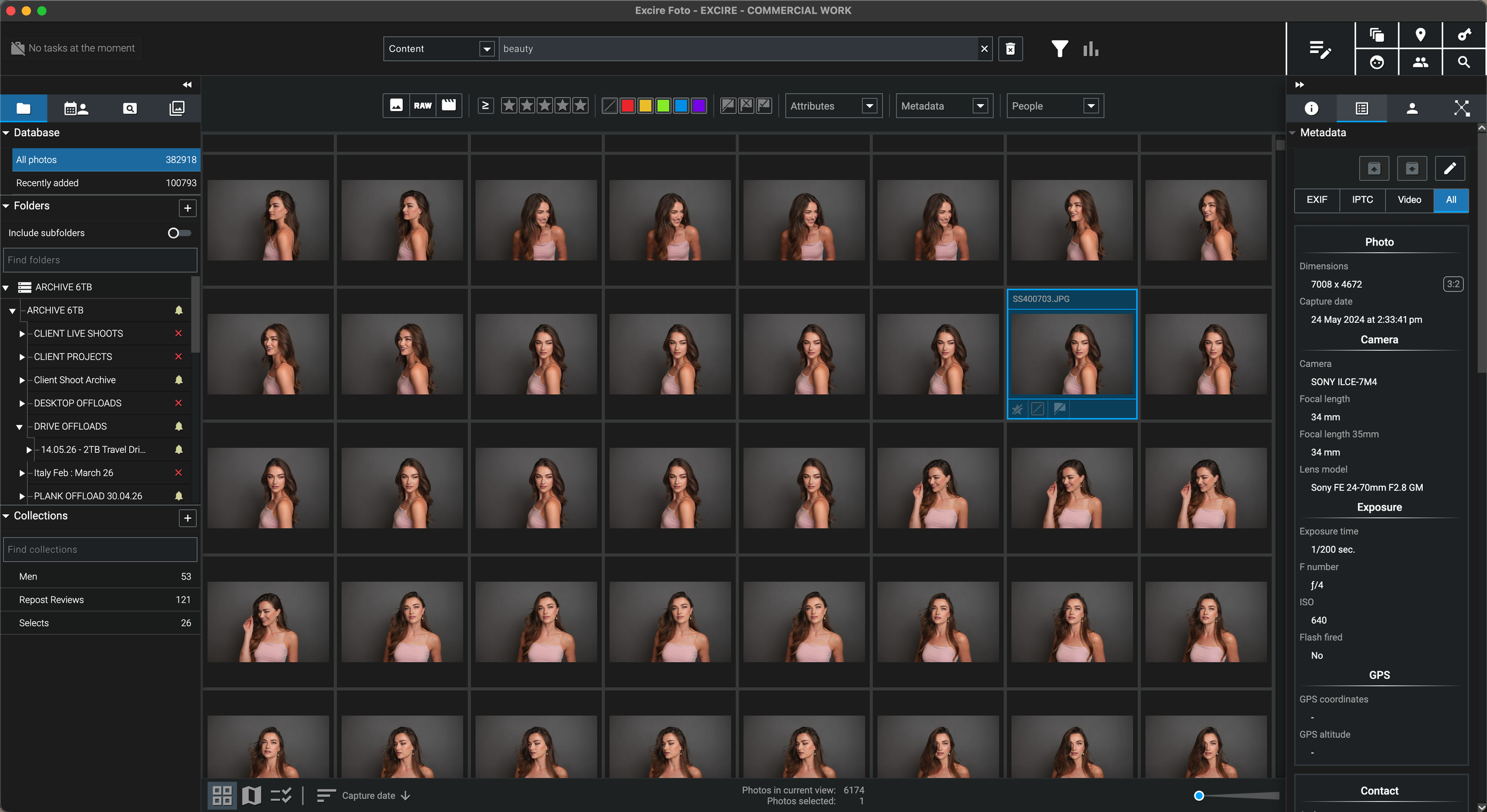
Excire keeps the catalogue information, thumbnails, generated previews, metadata and AI search data available on my computer. I can browse and search the archive while a source drive is offline, then reconnect the correct drive when I need the original RAW or full-resolution file.
Why This Matters
“The difficult part was no longer storing the photographs. It was finding the right image again years later.”
I have spent more than 25 years shooting beauty, skincare, hair, portrait, editorial, commercial, travel and personal photography. The complete archive is far too large to store on one laptop and is distributed across many working drives, completed-project drives and long-term archive drives.
A folder structure can tell me where I intended to place a shoot, but it cannot help when I only remember the model, lighting, colour palette, location or visual content. Searching drive after drive is slow, and keeping every archive disk permanently connected is neither practical nor desirable.
Excire Foto gives me a central photo catalogue above the physical storage. I can search the indexed archive by visual content, people, metadata, keywords and other AI information before deciding which external drive needs to be connected.
For photographers with a large photo library stored across external hard drives, this changes the workflow from finding the drive and then searching to finding the photograph and then connecting the drive.
External Hard Drive Catalogue Workflow
The original files remain in the folders you already use. The photo-management catalogue becomes the searchable visual layer above them.
RAW files, JPEGs, TIFFs and videos can remain in their existing project folders on your working or archive drive.
Connect the drive, add its folders to Excire and allow the software to build catalogue records, thumbnails, previews and AI information.
After the drive is disconnected, generated previews and catalogue data remain available for browsing and searching inside Excire.
When you find the image, reconnect the relevant external drive to open, copy, export or edit the original high-resolution file.
External Drive Photo Organiser Buying Guide
These are the capabilities I consider essential when organising a large RAW photo collection spread across multiple hard disks.
The software should reference photographs in their existing folders rather than forcing every original file onto the laptop or into a proprietary library.
A useful external-drive catalogue should remain visually browsable after the source disk is disconnected, while clearly showing that the originals are offline.
The catalogue should search across working drives, archive drives and computer folders without requiring you to remember which disk contains the photograph.
Once an image is found, the application must retain its folder path so you know which storage device to reconnect for the original file.
Content, people, visible text, metadata and natural-language search are far more useful than relying only on dates, folders and manually entered keywords.
If a drive letter, volume name or parent folder changes, the catalogue should provide a controlled way to relink the existing records to the new location.
Disconnected External Hard Drives
Offline catalogue access is extremely useful, but it is important to understand the difference between a preview and the original high-resolution photograph.
Depending on the preview settings and information already generated, you can browse thumbnails and previews, search AI content, inspect metadata, use ratings and collections, and identify the original folder while the external drive is offline.
Reconnect the source drive when you need to open the original in an editor, export a full-resolution copy, move or rename original files, regenerate missing data, or synchronise changes made outside Excire.
Recommended Storage Architecture
This arrangement keeps the active catalogue responsive while allowing a very large photography archive to remain on external storage.
Keep the working database on fast storage where possible. This contains catalogue records, AI information, thumbnails and generated previews—not a second copy of every original RAW file.
Store the original project folders on clearly named external drives. Use consistent volume names or drive letters so the catalogue can recognise the expected source path.
Back up the original photography drives and the Excire database separately. A searchable catalogue is valuable, but it is not a substitute for another verified copy of the source files.
My Recommendation
Its value is not simply that it can display folders. It allows me to search a fragmented professional archive as though it were one connected visual library.
Continue Through the Excire Hub
Read the complete Excire Foto hub or continue with a guide focused on the next part of your archive workflow.
External Hard Drive Photo Management FAQ
My recommendation is Excire Foto for photographers who want to catalogue images in their existing external-drive folders, search them using local AI and retain generated previews after a source drive is disconnected. It is particularly useful for large archives spread across several drives.
Yes. Folders from multiple connected storage locations can be added to an Excire Foto database. The catalogue can then search across those indexed folders, although each source drive must be reconnected when its original high-resolution files are required.
Excire can retain catalogue thumbnails and generated previews for indexed photographs, allowing the archive to remain browsable and searchable while a source folder is offline. Reconnect the drive for the original RAW file, full-resolution output or file operations requiring the source.
No. Excire references photographs in their existing locations and creates a separate database containing catalogue information, AI data, thumbnails and optional previews. The original files remain on the external hard drive unless you move them yourself.
For a responsive working catalogue, fast local SSD or NVMe storage is generally the strongest arrangement. The original photography folders can remain on external drives. The catalogue database should also be backed up separately.
Preview use depends on file types, preview settings and how many images have previews generated. Excire’s published guidance gives an example of roughly 25GB for 100,000 RAW photographs at the highest preview quality, in addition to the smaller database files.
Offline folders can be relocated to a new path when their parent location changes and the internal folder structure remains consistent. On Windows, assigning stable drive letters can reduce the chance of paths changing unexpectedly.
No. The catalogue helps you organise and find the photographs, but the original files and the catalogue database both need reliable backup copies. A searchable preview is not a replacement for the original RAW file.
Follow an Excire purchase button on this page and enter SIMONSONGHURST at checkout to receive 15% off eligible Excire software.
Save 15% on Excire Foto 2027
Excire Foto lets me search a professional archive spread across numerous external hard drives without keeping every drive connected or copying every original file onto my computer.
Return to my complete professional workflow Explore the photography, retouching, editing and asset-management software that supports the way I work.
Visit the Workflow Hub
