Memory stops scaling
You may remember what a photograph looked like without remembering the shoot date, client name, filename or exact archive folder.
Software for Large Photography Collections
The best software for organising a large photo library should help you search hundreds of thousands of photographs by visual content, people, metadata and location—without relying entirely on filenames or remembering which folder contains each image.
My current Excire Foto catalogue contains 382,918 photographs, and that is only a fraction of an archive I estimate contains between two and three million images from more than 25 years of professional photography.
Save 15% using my affiliate discount code:
This page contains affiliate links. I may earn a commission if you purchase through my link, at no additional cost to you. Use code SIMONSONGHURST for 15% off eligible Excire software.
Real Large-Library Proof
The screenshot below shows part of my professional beauty archive inside Excire Foto. The current catalogue contains nearly 383,000 images, while my complete back catalogue is substantially larger and spread across numerous storage locations.
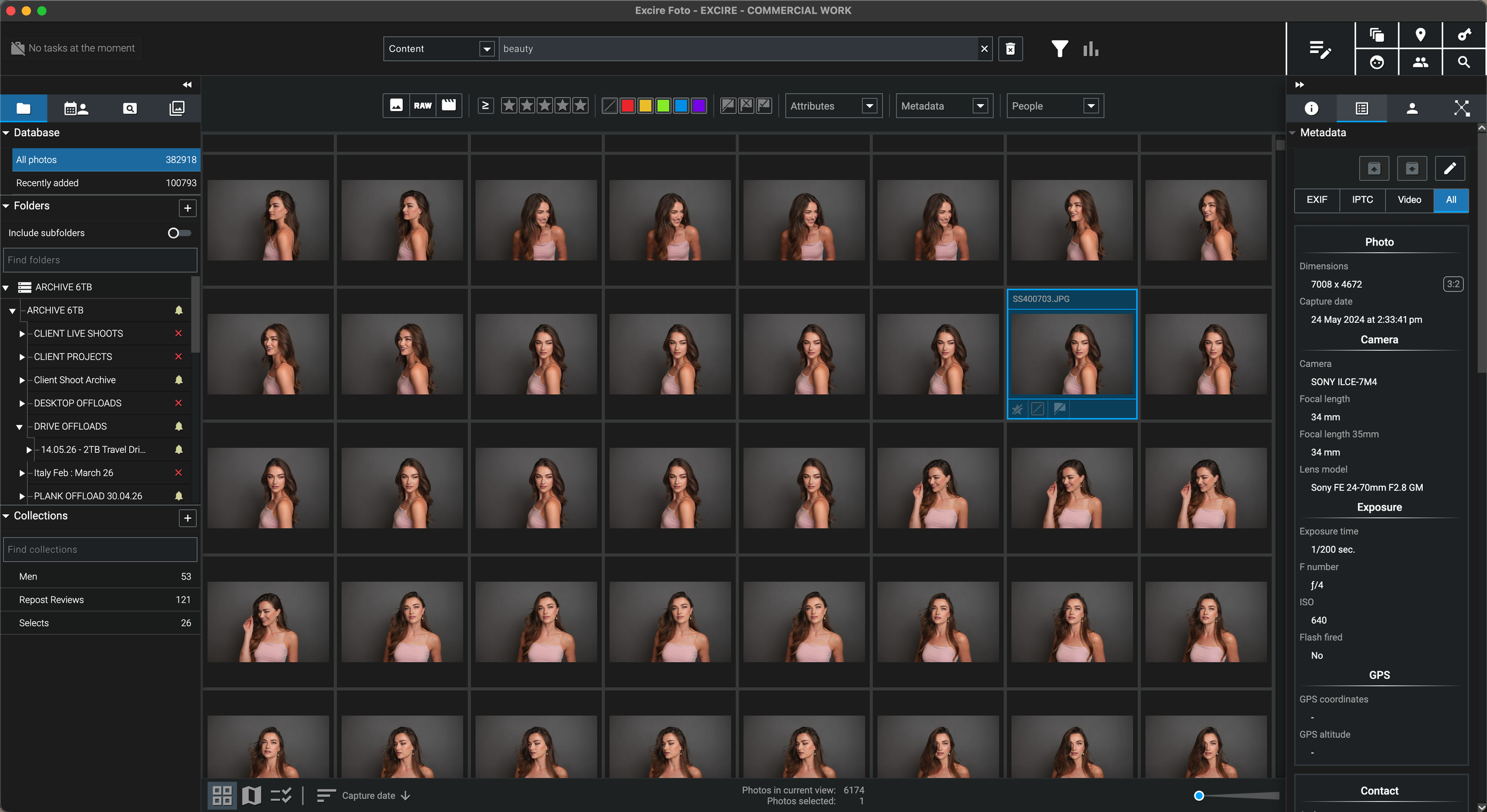
Once a photography archive reaches hundreds of thousands of files, remembering dates, filenames and folder structures is no longer a reliable retrieval system. Excire turns the catalogue into a visual and AI-searchable index so the photographs can be found by what they contain as well as where they are stored.
Why I Needed a Better System
“I could remember the photograph—but not always the year, client folder or drive that contained it.”
I have worked professionally for more than 25 years across beauty, skincare, hair, portrait, editorial, commercial, travel and personal photography. Over that time, I estimate that my complete back catalogue has grown to between two and three million images.
A collection of that size cannot be managed effectively by memory alone. Even a carefully designed folder structure eventually becomes difficult when projects span decades, naming conventions change, clients return, personal work overlaps with commissions and originals are distributed across several generations of storage.
My current Excire catalogue contains 382,918 photographs. It gives me one searchable visual layer above the physical files, allowing me to find images by content, people, metadata and other indexed information rather than opening folders one at a time.
This page is therefore not based on a theoretical recommendation. It reflects the kind of photo-management problem that appears when a working photographer has accumulated hundreds of thousands—or potentially millions—of images.
Why Ordinary Folders Stop Being Enough
Storage and organisation are not the same thing. A folder can hold an image safely while still making that image extremely difficult to rediscover.
You may remember what a photograph looked like without remembering the shoot date, client name, filename or exact archive folder.
Years of changing workflows can leave projects organised by date, client, location, subject, job number or several systems at once.
Adding detailed keywords by hand to every image is rarely realistic when new shoots continually add thousands of files.
Valuable work can become effectively invisible because the photographer no longer remembers where it was filed or which project contained it.
What Large-Library Software Should Do
Software for a huge photography collection must make the archive easier to search, navigate and maintain—not simply display the same folders in a different interface.
Search for subjects, scenes, activities, moods or descriptive phrases when the filename and folder location are unknown.
Locate particular people, similar faces and portrait sequences throughout a large beauty, wedding, family or commercial archive.
Filter by date, camera, lens, focal length, rating, label, file type, dimensions or other stored metadata.
Use thumbnails and generated previews as a fast visual index while the full-resolution originals remain in their existing storage locations.
Create virtual selections for portfolios, licensing, clients, subjects or future projects without duplicating or reorganising the originals.
The catalogue must continue delivering responsive search and navigation as tens of thousands of images become hundreds of thousands.
How Large Can One Catalogue Be?
The ideal catalogue size depends on the computer, database storage and workflow. Excire recommends a practical upper limit of approximately one million photographs in a single database.
A collection of this size is substantial but generally straightforward for a modern computer when the database is stored on fast local storage.
This is the range of my current 382,918-image catalogue. Fast SSD storage, sufficient memory and sensible preview settings become increasingly important.
Excire advises that a single database can remain practical up to around one million images when it is held on a fast local SSD with sufficient RAM.
Very large archives can be divided by year, professional discipline, client category or project group to maintain speed and make backups more manageable.
Performance and Storage Planning
Large photo-management catalogues become much easier to use when the database, previews and original archive are treated as separate parts of the system.
Excire recommends local fast storage for the catalogue rather than placing the active database on a network drive or slow external disk.
Excire lists 8GB as the minimum and recommends 16GB or more, which becomes particularly relevant with very large libraries.
At the highest settings, preview storage can reach approximately 25GB per 100,000 RAW photographs when a preview is generated for every image.
Importing, generating previews and analysing hundreds of thousands of files is an initial investment, but it replaces repeated manual searching later.
Back up the catalogue and generated previews as well as the original photographs so a hardware failure does not require the entire archive to be analysed again.
The searchable catalogue can sit on the computer while original RAW files remain distributed across your established internal and external storage.
A Practical Large-Library Workflow
The catalogue should complement a sensible storage structure rather than encourage a completely unstructured collection.
Use consistent top-level folders based on year, client, project type or another system that will still make sense in the future.
Index one logical section at a time so progress is manageable and the catalogue can begin providing value before every historical drive is complete.
Choose preview quality according to whether the catalogue is mainly for identification or detailed offline assessment.
Use descriptions, faces, visible text, metadata and filters to find work that would otherwise remain buried in an old project folder.
Why I Recommend Excire Foto
The strongest benefit is not simply knowing that the files exist. It is being able to find and reuse them when an opportunity appears.
Continue Through the Excire Hub
Visit the central Excire Foto hub or continue with a guide focused on external drives, offline previews, professional archives or AI image search.
Large Photo Library FAQ
For photographers who need standalone photo management rather than another editor, I recommend Excire Foto. It combines visual cataloguing, AI content search, face recognition, metadata filtering, collections, previews and support for originals stored across existing folders and drives.
Yes. Excire describes a library of up to 100,000 photographs as comfortably suitable for a single catalogue, assuming the computer meets the system requirements and the database is stored appropriately.
Excire recommends one catalogue for collections between 100,000 and 500,000 photographs when it is used with good hardware. My current catalogue contains 382,918 photographs.
Excire recommends approximately one million photographs as the practical upper limit for a single database when the catalogue is stored on a fast local SSD and the computer has sufficient RAM.
Very large archives can be divided into separate databases by year, professional discipline, project group or another clear boundary. The disadvantage is that searches do not span several databases simultaneously, so the division should be planned carefully.
Excire states that preview storage can reach approximately 25GB for every 100,000 RAW photographs when the highest quality is selected and a preview is generated for every file. Lower preview requirements can reduce this amount.
No. Excire references photographs in their existing locations. A consistent physical folder structure remains useful, while Excire adds the visual catalogue, metadata tools and AI search layer above it.
No. Excire Foto is designed for photo and video management, searching, organising, selecting and cataloguing. The original can then be opened in a separate RAW editor such as DxO PhotoLab, Capture One or another preferred application.
Follow an Excire purchase button on this page and enter SIMONSONGHURST at checkout to receive 15% off eligible Excire software.
Save 15% on Excire Foto 2027
I use Excire Foto with a working catalogue of 382,918 images to search and rediscover photographs accumulated across more than 25 years of professional work.
Return to my complete professional workflow Explore the photography, retouching, editing and asset-management software that supports the way I work.
Visit the Workflow Hub
