Primary archive drives
These contain the organised original RAW files, finished projects and other master assets that Excire references.
Organising Photos Across Several Drives
The most practical way to organise photographs stored across several external hard drives is to combine a stable physical archive with one visual, searchable catalogue that tells you what you have and where the original file is stored.
After more than 25 years as a professional photographer, I estimate that my complete back catalogue contains between two and three million images. Excire Foto now helps me search a growing catalogue of 382,918 photographs distributed across my computer and numerous archive drives.
Save 15% using my affiliate discount code:
This page contains affiliate links. I may earn a commission if you purchase through my link, at no additional cost to you. Use code SIMONSONGHURST for 15% off eligible Excire software.
A Real Multiple-Drive Photography Archive
The folder panel in this screenshot shows only part of the archive structure behind my current Excire Foto database. Some source folders are available, others are offline, yet the catalogue continues to give me a visual overview of the photographs already indexed.
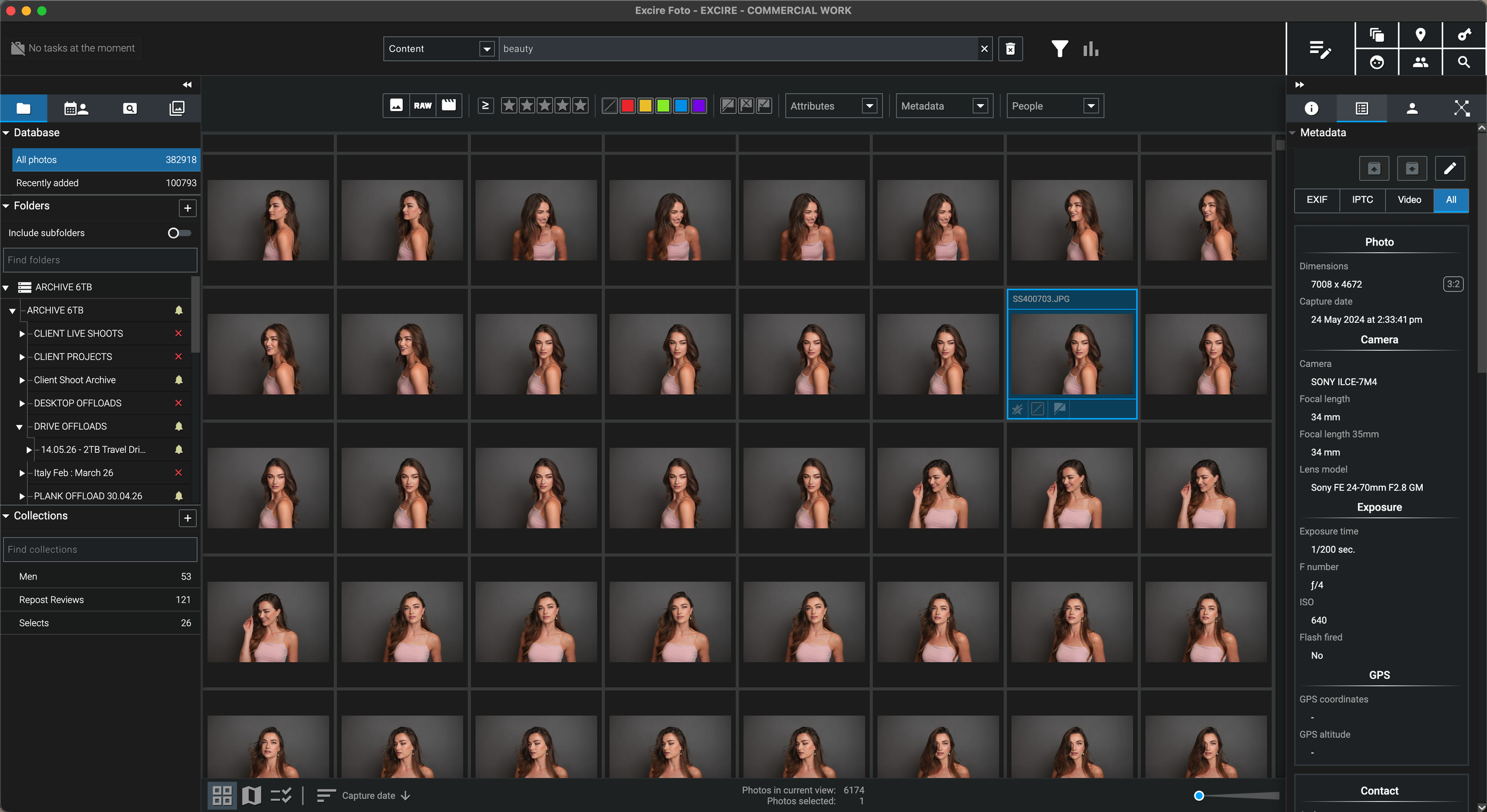
I do not need to copy every high-resolution original onto one laptop. Excire provides the searchable visual layer, while the original RAW files can remain on the external hard drives where the archive is already stored.
Why This Became Essential
“The problem was no longer storing the photographs. It was remembering which of many drives contained the image I needed.”
I have photographed beauty, skincare, hair, portrait, editorial, commercial, travel and personal projects for more than 25 years. The work spans different cameras, clients, computers, folder structures and generations of external storage.
As the archive grew, simply buying another hard drive solved the capacity problem but made the retrieval problem worse. A photograph could be safely backed up and still become almost impossible to find unless I remembered the approximate year, client, job title and physical drive.
My current Excire catalogue contains 382,918 photographs, but I estimate that the complete archive contains between two and three million images. Indexing the archive in stages gives me a single visual catalogue above many separate drives, without requiring all of the full-resolution originals to live on my computer.
That distinction is crucial: the hard drives store the originals; Excire makes the archive searchable.
The Four-Part Archive System
The cleanest multiple-hard-drive workflow assigns a clear purpose to each part of the system. This avoids confusing a searchable catalogue with the original archive or a genuine backup.
These contain the organised original RAW files, finished projects and other master assets that Excire references.
A second copy protects the photographs if an archive drive fails. The Excire catalogue is useful, but it does not replace a backup of the originals.
The catalogue, thumbnails, previews and AI information provide fast search and browsing across the indexed archive.
Active shoots can remain on faster everyday storage before being completed, backed up and transferred into the long-term archive.
What Should Live Where?
The exact hardware can change, but the responsibilities should remain clear. This makes a large photography archive easier to maintain, move and recover.
Use stable drive names and a consistent hierarchy so the original RAW files remain understandable even without opening Excire.
The database contains the information that makes the archive searchable. Fast local storage improves responsiveness and keeps indexed previews available while archive drives are offline.
A catalogue can tell you that an image existed, but only an independent backup can recover the original if the primary drive fails.
Protect the database, thumbnails, previews and analysis so a computer failure does not force the entire multi-drive archive to be indexed again.
Step-by-Step Multiple-Drive Workflow
The archive does not need to be rebuilt in one day. A staged approach lets the catalogue become useful while older drives are gradually added and analysed.
List each hard drive, its capacity, approximate contents, working status and whether a verified backup already exists.
Use durable labels such as PHOTO-ARCHIVE-01 and PHOTO-ARCHIVE-02 so the physical disk and its catalogue location can be identified quickly.
Choose a system based on years, clients, projects or disciplines and retain the same logic as new drives are added.
Connect a drive, add its photography folders to Excire and allow the relevant previews and AI analysis to complete.
Disconnect the drive and confirm that the indexed thumbnails, previews and search information remain useful for identifying the work.
Protect the original photographs and the Excire database separately before continuing to the next archive drive.
A Folder Structure That Survives
Excire makes searching dramatically easier, but a clear underlying structure still matters when drives are moved, replaced, restored or accessed from another application.
Give every archive disk a permanent physical label and matching computer name so the correct original can be reconnected quickly.
Organise by year, client, project type or another long-term system rather than temporary labels that may lose meaning.
Moving a complete folder tree is much easier to relink than completely reorganising thousands of folders after they have been catalogued.
Keep a simple record of which years, clients or projects live on each drive and where its independent backup is stored.
When a Drive Name or Path Changes
External storage changes over time. Drives are replaced, folders move and Windows can assign a different drive letter. Planning for this makes the catalogue much easier to maintain.
Excire marks unavailable source folders as offline. Their indexed catalogue information remains present, and reconnecting the original path restores access to the source files.
Excire provides a Relocate command for offline folders. It works best when the internal folder structure has stayed the same and only the parent location has changed.
When new files are added to an already catalogued folder, synchronising that folder updates the database without rebuilding the entire archive.
Completely changing the hierarchy after indexing can make relinking much more difficult. Finalise the physical structure before analysing a major archive whenever possible.
Why Excire Works for This Problem
The software is valuable because it allows the storage strategy and the search strategy to remain separate. The originals can stay where capacity and backup requirements dictate, while Excire provides one interface for discovery.
See indexed work from internal folders and multiple archive drives inside the same photography catalogue.
Use retained catalogue previews and AI information to identify the required image, project and storage location first.
Search by subjects, scenes, people, visible text and descriptive phrases when the physical location has been forgotten.
Filter by date, camera, lens, rating, file type and other metadata rather than opening each drive separately.
Create portfolio, licensing, client or subject collections that can include photographs stored on different drives.
Excire’s analysis runs locally, allowing confidential and unpublished photography to remain on your own computer and archive drives.
My Professional Verdict
Adding storage protects future capacity. Adding a searchable catalogue gives the existing archive renewed value by making older photographs easier to discover, retrieve and reuse.
Continue Through the Excire Hub
Explore the complete Excire Foto hub or continue with a closely related guide focused on external storage, disconnected drives, large libraries or professional archive management.
Multiple Hard Drive Photo Organisation FAQ
Use a consistent physical folder structure, permanent drive labels, independent backups and a central photo-management catalogue. I use Excire Foto to create one searchable visual index above photographs stored across several internal and external drives.
Yes. Each drive can be connected and its folders added to the catalogue. Once the photographs have been indexed and the required previews generated, the catalogue can contain work from multiple storage locations.
No. A drive needs to be connected when its folders are first added and analysed, and again when you need the original files. Indexed thumbnails, previews and catalogue information can remain available while other source drives are disconnected.
Yes, provided the photographs have already been catalogued and suitable previews have been generated. You can search and browse the catalogue, then reconnect the correct drive to access or edit the original high-resolution file.
Excire marks unavailable folders as offline and provides a Relocate command to link an offline folder to its new location. Relocation works best when the internal folder structure remains unchanged and only the parent path or drive letter has changed.
Excire references the photographs in their existing storage locations and maintains its own database, thumbnails, previews and analysis information. The full-resolution originals can remain on their external archive drives.
No. The catalogue makes the archive searchable but does not replace an independent backup of the original files. Back up the photographs and the Excire database separately.
One catalogue is useful when you want to search several drives as a unified collection. Exceptionally large archives may benefit from more than one deliberate database, but the division should follow clear boundaries because searches do not span separate databases simultaneously.
Follow an Excire purchase button on this page and enter SIMONSONGHURST at checkout to receive 15% off eligible Excire software.
Save 15% on Excire Foto 2027
I use Excire Foto to search a working catalogue of 382,918 photographs stored across several locations, while the original high-resolution files remain on my archive drives.
Return to my complete professional workflow Explore the photography, retouching, editing and asset-management software that supports the way I work.
Visit the Workflow Hub
