Scale
Professional careers can generate hundreds of thousands or millions of RAW files, exports, selects, variations and finished images.
Professional Photography Archive Management
The best professional photo archive software should do more than display folders. It should help you rediscover decades of client, commercial and personal photography—even when the original files are distributed across many external hard drives.
After more than 25 years as a professional photographer, I estimate that my complete back catalogue contains between two and three million images. My current Excire Foto catalogue already contains 382,918 photographs, turning a fragmented archive into a visual collection I can search by subject, person, metadata and description.
Save 15% using my affiliate discount code:
This page contains affiliate links. I may earn a commission if you purchase through my link, at no additional cost to you. Use code SIMONSONGHURST for 15% off eligible Excire software.
A Real Professional Photography Catalogue
The beauty images visible here represent one small area of a much larger professional back catalogue covering beauty, skincare, hair, portrait, editorial, commercial, travel and personal photography.
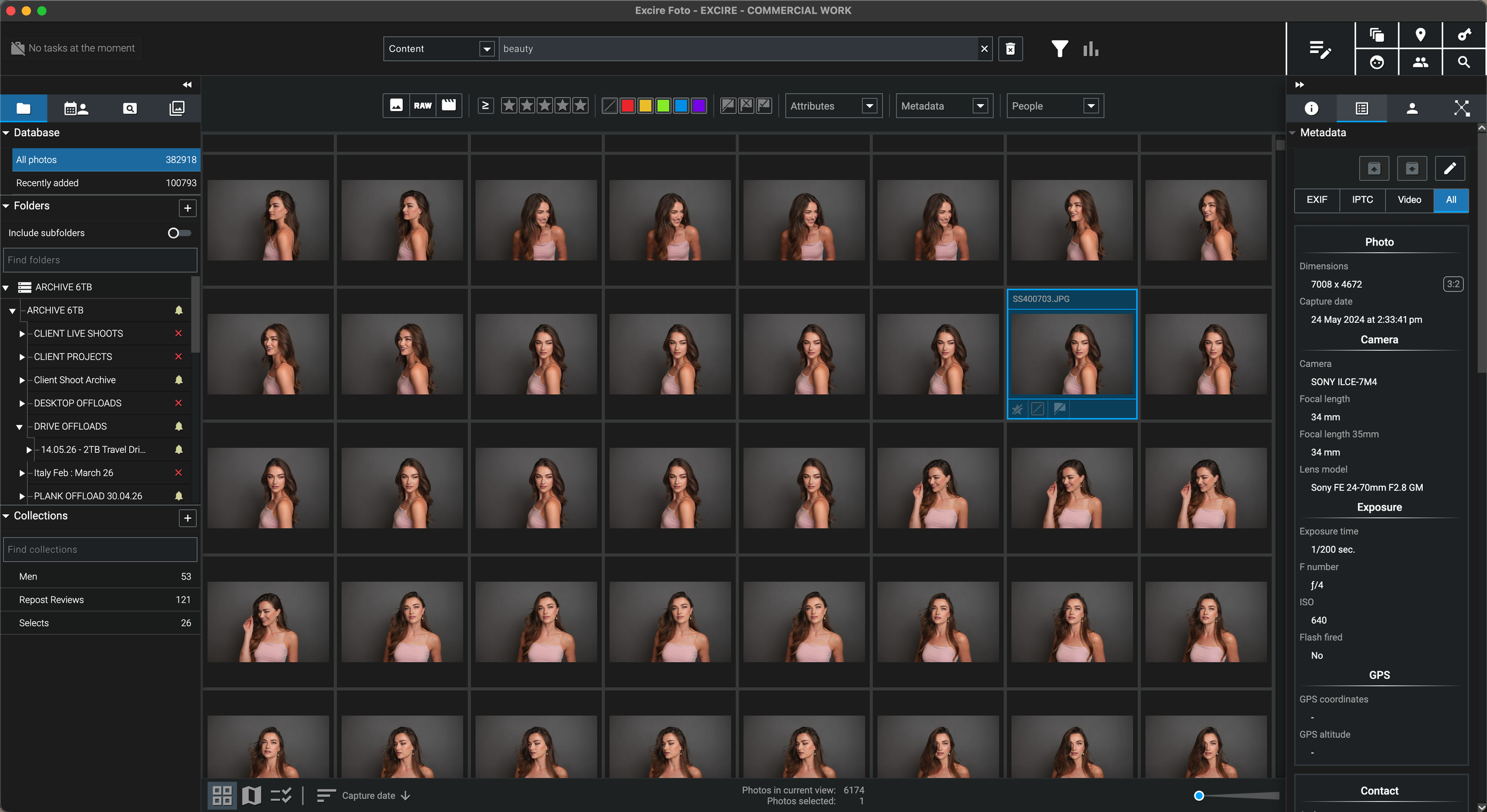
Excire helps me search images accumulated over more than 25 years without relying solely on old client names, job numbers, folder structures or memories of which physical drive contains the original.
Why I Needed a Better Archive
“I had millions of photographs safely stored—but safely stored is not the same as searchable.”
I have spent more than 25 years working professionally across beauty, skincare, hair, portrait, editorial and commercial photography, alongside travel, street and personal projects. The archive spans changing cameras, computers, clients, assistants, naming systems and generations of external hard drives.
Earlier work may have been filed by client, publication, campaign, date, job number or a folder name that made perfect sense at the time. Years later, I may remember the model, styling, lighting or visual mood of a photograph—but not the precise year or drive where it lives.
Excire Foto gives me another route into that archive. Instead of depending entirely on filenames, I can search visual content, people, metadata, dates, cameras, lenses and descriptive phrases, then reconnect the relevant storage when I need the original high-resolution file.
For me, the software is not simply an organiser. It is a way to recover the creative and commercial value of photographs that might otherwise remain hidden on archive drives.
What Professional Archive Software Must Solve
A working archive has to preserve the originals, reveal what exists, identify where each file is stored and help the photographer retrieve useful work quickly.
Professional careers can generate hundreds of thousands or millions of RAW files, exports, selects, variations and finished images.
Work is often distributed across current storage, client folders, completed-job drives, long-term archives and independent backups.
It becomes unrealistic to remember the exact client, year, filename or physical drive associated with every useful photograph.
The catalogue must help you identify the image and its source location before opening or reconnecting every archive drive.
The Professional Archive Layer
You do not need to consolidate every original RAW file onto one laptop. Excire can provide the discovery layer while the master photographs remain organised on the storage system suited to their size and age.
RAW files, layered masters and high-resolution exports can stay in the folder structure and on the external drives where they are already stored.
The local Excire database creates the visual and searchable index that helps you discover relevant work without loading every full-resolution file onto the computer.
A photo catalogue improves access, but it is not a replacement for verified backups of the original photographs and finished client files.
Excire is the archive-management and search layer. I can locate the photograph first, then open the original in my preferred editing or retouching software.
High-Value Professional Use Cases
The commercial benefit is not limited to tidier folders. Faster retrieval can unlock older work for clients, portfolios, licensing, content, education and new creative projects.
Search by people, subject matter, date, camera or visual description when a former client asks for an image years later.
Review related beauty, portrait or commercial work across different years and drives without opening every historic project manually.
Find travel, street, editorial or generic commercial imagery that may have continuing editorial or licensing potential.
Search decades of work for behind-the-scenes stories, photography education, social content and career retrospectives.
Bring related lighting styles, subjects, lenses or locations together to understand recurring patterns across your career.
A structured catalogue makes the archive easier to understand, maintain and eventually transfer than a cupboard of anonymously labelled drives.
How I Search the Archive
I may remember a person, location, camera, visual detail or approximate period. A useful professional archive should let me combine those clues instead of forcing every search through one folder tree.
Search for a visual idea such as beauty portrait, red lipstick, studio lighting, city street at night or beach at sunset.
Use face and people tools to locate related portraits, beauty photographs, family images or event sequences.
Narrow the catalogue by date, camera, lens, file type, rating or other stored information when a technical clue is remembered.
Once the required photograph and storage location are identified, connect the correct drive to access the original master file.
Professional Workflow
A reliable system treats current work and historic work differently while preserving a clear path from capture to backup, catalogue and future retrieval.
Copy a shoot to active working storage, verify the transfer and create the required independent backup before formatting cards.
Complete the professional selection, RAW processing, retouching, delivery and client-output stages in the applications suited to the job.
Retain the relevant originals, selects, master files, exports and project information inside a stable final folder structure.
Transfer completed projects onto clearly named long-term drives while retaining a separate verified backup copy.
Add the final archive folders, generate the required previews and complete the local AI analysis for future searching.
Back up the Excire database, previews and analysis alongside the separate backup strategy for the original photography archive.
Privacy and Professional Control
Professional archives can contain unpublished campaigns, personal portraits, commercial products and work covered by client agreements. Local processing is therefore more than a convenience.
Excire performs its AI analysis locally on the computer, allowing the photographs and videos to remain under the photographer’s control.
The high-resolution masters can remain on internal, external or archive storage rather than being transferred into a compulsory cloud library.
Excire Foto 2027 is sold as a one-time purchase for the licensed version, which may suit photographers building a long-term archive workflow.
The archive catalogue can work alongside the editing software already used for professional RAW processing, retouching and final delivery.
My Professional Verdict
For a photographer with decades of work, the real benefit is not simply tidiness. It is being able to retrieve, reuse and reassess images that would otherwise remain effectively invisible.
Continue Through the Excire Hub
Explore the complete Excire Foto hub or continue with a focused guide about external storage, disconnected archives, large libraries or visual AI search.
Professional Photo Archive Software FAQ
Professional photo archive software creates a searchable catalogue of photography stored across computers, folders and external drives. It can help organise metadata, previews, people, visual content and storage locations without replacing the original master files or specialist editing applications.
Use clearly labelled archive drives, a stable folder hierarchy, verified independent backups and a central searchable catalogue. I use Excire Foto to build one visual index above a professional archive distributed across many storage locations.
Excire Foto is designed for photo and video management and can catalogue large collections using previews, metadata and locally processed AI information. My current real-world catalogue contains 382,918 photographs from more than 25 years of professional and personal work.
Yes. Excire references photographs in their existing locations while maintaining its own catalogue, thumbnails, previews and analysis data. The original RAW files can remain on the external drives where the archive is stored.
Yes. Excire can search and filter photographs using visual content, descriptive text, people, faces, dates, cameras, lenses, ratings and other metadata, reducing dependence on old filenames and folder names.
No. Excire Foto manages, searches, organises and helps select photographs. The original file can then be opened in your preferred RAW processor, retouching application or editing workflow.
Yes. Local processing means the AI analysis takes place on the computer rather than requiring the professional archive to be uploaded for cloud analysis, which can be important for confidential client work and unpublished campaigns.
Excire Foto 2027 is sold as a one-time purchase for the licensed version. It is professional photo-management software rather than a free application, and future major upgrades may be offered separately.
Follow an Excire purchase button on this page and enter SIMONSONGHURST at checkout to receive 15% off eligible Excire software.
Save 15% on Excire Foto 2027
I use Excire Foto to search a working catalogue of 382,918 photographs from an estimated two-to-three-million-image back catalogue built over more than 25 years.
Return to my complete professional workflow Explore the photography, retouching, editing and asset-management software that supports the way I work.
Visit the Workflow Hub
