Describe what you remember
Start with a phrase that describes the subject, setting, action, colour, mood or combination of details visible in the photograph.
AI Search for Large Photography Archives
The best AI photo search software lets you find an image even when you cannot remember its filename, capture date, client folder or storage drive. Describe the scene, subject, mood or visual detail you remember, and use that description to search the archive.
My current Excire Foto catalogue contains 382,918 photographs from a professional archive I estimate at between two and three million images. At that scale, remembering filenames is impossible. AI content search gives me a far more natural way to rediscover photographs across decades of beauty, portrait, commercial, travel and personal work.
Save 15% using my affiliate discount code:
This page contains affiliate links. I may earn a commission if you purchase through my link, at no additional cost to you. Use code SIMONSONGHURST for 15% off eligible Excire software.
Real-World AI Photo Search at Scale
The beauty images shown here are a small selection from a catalogue covering more than 25 years of professional and personal photography. AI search helps me move through the archive using visual memory rather than old folder names.
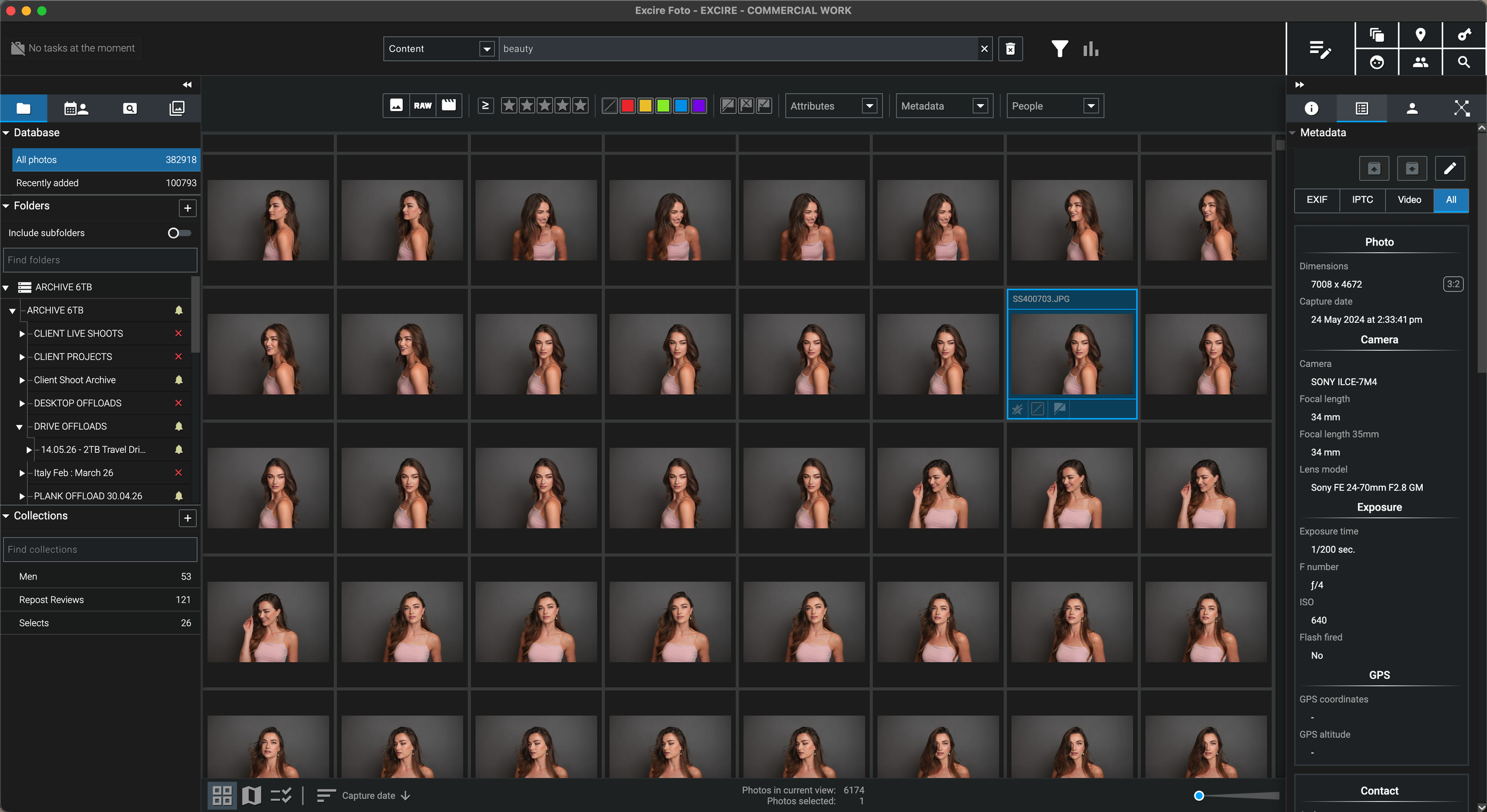
I may remember a close-up beauty portrait, a particular hairstyle, a model against a white background or a street scene at night—without remembering the year, client name or drive. AI content search gives me another route back to the image.
Why AI Search Matters to Me
“I often remember what a photograph looked like long after I have forgotten where I filed it.”
Over more than 25 years as a professional photographer, I have worked across beauty, skincare, hair, portrait, editorial and commercial photography, alongside travel, street and personal projects. The resulting archive has passed through many cameras, computers, assistants, clients and storage systems.
A folder structure is still essential, but folders only help when I remember the language used to organise the shoot. Older jobs may be filed by client, publication, date, campaign name, job number or a description that made sense at the time.
AI photo search changes the starting point. I can begin with the thing I actually remember: the visual content. A phrase such as “close-up beauty portrait with red lipstick”, “woman with wet-look hair” or “city street at night” can bring related images together without requiring those exact words to have been manually added years ago.
That makes Excire valuable not only as a photo organiser, but as a practical discovery tool for a professional back catalogue that would otherwise be too large to search manually.
How AI Photo Search Works
Excire Foto 2027 can use a descriptive phrase to search the visual content of the catalogue. The first result set can then be narrowed with people, dates, cameras, lenses, file types, ratings and other available filters.
Start with a phrase that describes the subject, setting, action, colour, mood or combination of details visible in the photograph.
Excire evaluates the catalogue content and displays photographs that visually relate to the description rather than depending only on filenames.
Narrow the search using dates, camera or lens metadata, ratings, people, file formats and other information when additional clues are available.
Once the required image is identified, reconnect its external drive if necessary and open the high-resolution file in your preferred editing software.
Search by Meaning, Not Only Metadata
Traditional organisation remains useful, but it depends on information that was recorded at the time. AI content search can help when the only reliable clue is what the photograph actually looks like.
Folders work well when you know the client, date, location or project name used when the photographs were archived.
Camera, lens, capture date, file type, rating and other metadata can narrow a large archive when the technical clue is known.
Manually entered or automatically generated keywords create a structured vocabulary for finding known subjects and categories.
A descriptive phrase can search the visual meaning of the image, helping retrieve photographs that were never manually labelled with the exact wording.
Search Ideas for Photographers
These examples show the kind of visual clues a photographer or content creator may remember when the filename, folder and capture date have been forgotten.
Bring visually related beauty images together across different clients, models, years and archive drives.
Search a professional hair archive using remembered styling and visual treatment rather than an old campaign name.
Locate product and campaign imagery that shares a visual setup even when the projects were created years apart.
Search travel and documentary photographs by activity, environment and atmosphere instead of country folders alone.
Find scenes by season, mood and subject even when the exact destination or capture date is unclear.
Excire Foto 2027 can also recognise visible text such as street signs, storefronts, posters and information boards.
A Useful Excire Foto 2027 Detail
Understanding the text filter helps produce better searches and avoids assuming that every text entry is processed as an AI description.
A phrase such as “people eating outdoors” or “peaceful winter landscape” prompts Excire to evaluate the overall visual content.
Entering one word such as “beach” searches the available keywords and metadata rather than running the same free-text process.
AI results are not infallible. Change the phrasing, simplify the prompt or combine it with filters when the first results are too broad.
Once a useful visual group appears, narrow it by date, camera, lens, person, rating or file type to reach the final image faster.
Why Large Archives Benefit Most
A collection of a few hundred photographs can be browsed manually. A catalogue containing hundreds of thousands—or a career archive containing millions—requires faster paths to discovery.
Search the visible subject or styling when the client name, production date and final folder structure are no longer memorable.
Review similar portrait, beauty, commercial or travel images from different periods without manually opening every shoot.
Locate forgotten travel, editorial or generic imagery that may still have value for licensing, publishing or new client requests.
Search a career archive for examples that support tutorials, retrospectives, case studies and behind-the-scenes stories.
Identify the likely photograph and its source location in the catalogue, then connect the relevant archive drive for the original.
Search recurring subjects, lighting styles, moods and visual approaches across years of work that were previously separated by folders.
Local AI and Existing Storage
Excire performs its image analysis locally and can catalogue photographs in their existing locations, including originals stored across external archive drives.
This can be important for professional, personal and unpublished photography that you do not want uploaded simply to make it searchable.
The catalogue provides the search layer while the original RAW files and finished masters remain on the storage system suited to their size.
Excire maintains catalogue information, thumbnails and previews that make a very large collection practical to browse and search.
Excire helps locate and organise the image; specialist software can continue handling RAW processing, retouching and final output.
My AI Photo Search Verdict
Natural-language search does not remove the need for a sensible archive, but it adds a powerful visual route into a collection that has become too large to navigate from memory.
Continue Through the Excire Hub
Explore the complete Excire Foto hub or continue with a focused guide about external storage, disconnected drives, large catalogues, people search or local AI photo management.
AI Photo Search Software FAQ
AI photo search software analyses the visual content of photographs so they can be retrieved by subject, scene, activity, mood, people or a natural-language description rather than relying only on filenames and manually entered keywords.
Yes. Excire Foto supports free-text content search. Entering a descriptive phrase allows the software to return photographs whose visual content relates to that description, even when the exact wording was never manually added as a keyword.
Yes. That is one of the strongest uses for content-based image search. Describe the visible subject, environment, action, colour or mood, then combine the results with dates, camera data or other filters if needed.
Excire Foto can catalogue and analyse supported photo formats, including many RAW files. Display support for particular RAW formats can depend on the operating system and camera format, so the free trial is the best way to test a specific archive.
Keyword search looks for words stored in metadata or assigned tags. AI content search evaluates what appears visually in the photograph and can retrieve images related to a descriptive phrase even when those exact keywords were never attached to the file.
In Excire Foto 2027, a multi-word description uses AI-powered free-text search, while a single word automatically searches keywords and metadata. A descriptive phrase is therefore better when you want the software to evaluate the overall image content.
AI search can be extremely useful, but it is not perfect. Results depend on the description and the contents of the catalogue. Try alternative wording and combine the search with metadata filters when the first result set is too broad.
No. Excire states that its AI processing takes place locally on the computer, allowing the photographs and videos to remain on storage under the user’s control.
Follow an Excire purchase button on this page and enter SIMONSONGHURST at checkout to receive 15% off eligible Excire software.
Save 15% on Excire Foto 2027
I use Excire Foto to search a 382,918-image working catalogue by visual content, description and metadata across more than 25 years of photography.
Return to my complete professional workflow Explore the photography, retouching, editing and asset-management software that supports the way I work.
Visit the Workflow Hub
