Select a clear reference photograph
Choose an image containing the person you want to find and identify the relevant face when more than one person appears in the frame.
People Search for Large Photography Archives
The best photo organiser with face recognition should help you locate photographs of a particular person across years of portrait, beauty, wedding, event, family and commercial work—without manually opening every folder.
My current Excire Foto catalogue contains 382,918 photographs, including a substantial archive of beauty, hair, portrait and commercial imagery. With an estimated two to three million images in my complete back catalogue, being able to search visually for people is far more practical than relying on filenames or remembering which external hard drive contains a particular shoot.
Save 15% using my affiliate discount code:
This page contains affiliate links. I may earn a commission if you purchase through my link, at no additional cost to you. Use code SIMONSONGHURST for 15% off eligible Excire software.
A Real Portrait and Beauty Archive
The screenshot below shows a small selection of beauty photographs from my professional archive. Excire gives me a central catalogue for searching work that is otherwise distributed across many external hard drives.
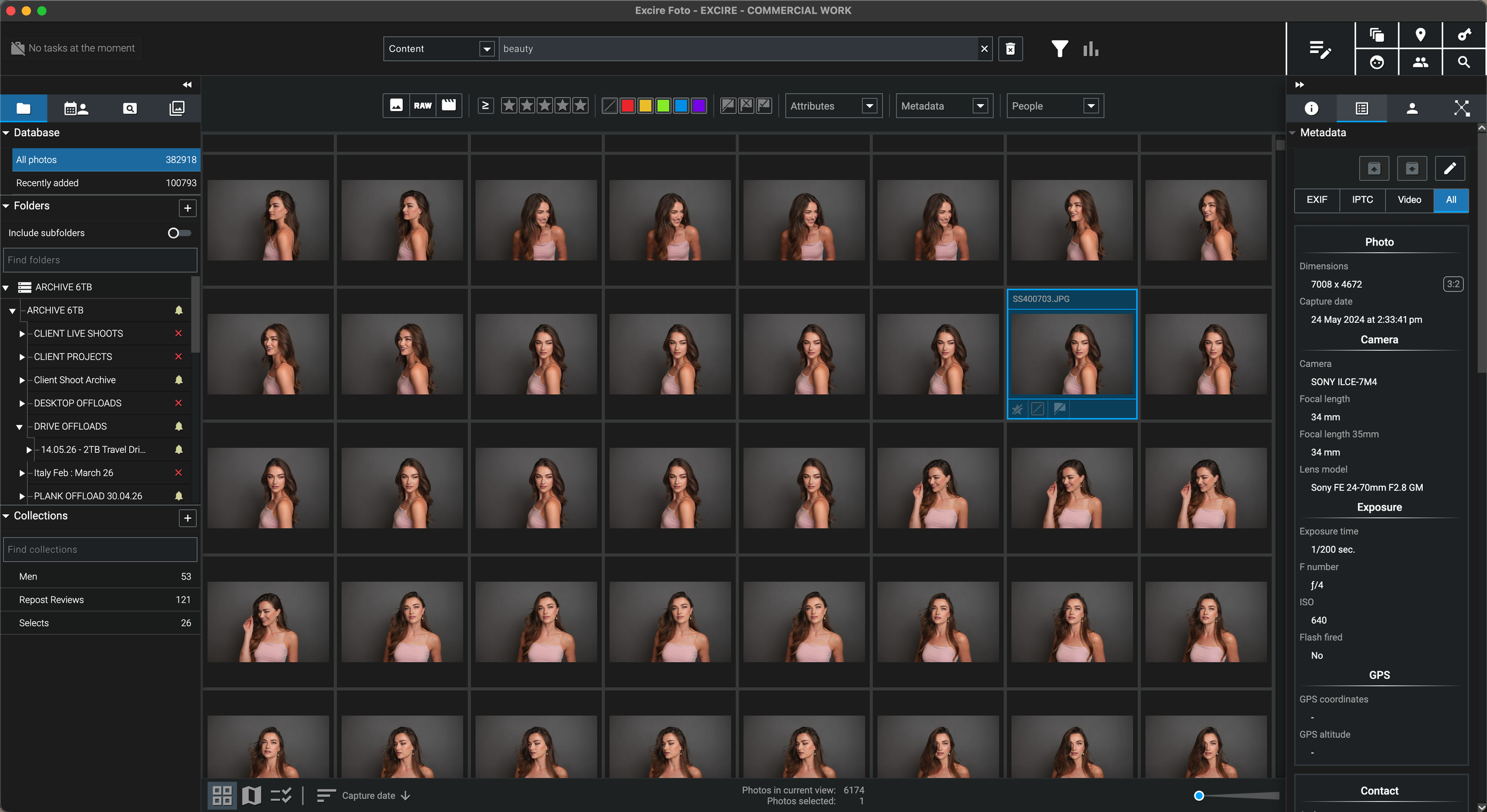
I may remember the model, expression, hairstyle or visual treatment but not the client, year or archive drive. Face and people search creates a direct route back to the photographs themselves.
Why People Search Matters to Me
“A large part of my 25-year career has involved photographing people, faces, beauty and hair.”
I have spent more than 25 years working as a professional photographer across beauty, skincare, hair, portrait, editorial and commercial photography. The same model, artist, client or subject may appear in several shoots spread across different years, computers and external archive drives.
Traditional folders are still essential, but they answer questions about where a job was filed. They do not always answer a more human question such as: “Show me every shoot containing this person.”
A face recognition photo organiser allows me to begin with a reference portrait and search for visually matching appearances across the catalogue. That can help me revisit a model’s previous work, locate a forgotten commercial image, assemble a retrospective or recover pictures requested by a client.
For a professional archive of this scale, people search is not merely a novelty. It is another practical route into decades of work that would otherwise depend on memory and manual folder browsing.
How Face and People Search Works
Excire can use a selected face as the visual reference for a people search. The results can then be reviewed, narrowed and organised without relying on the person’s name already being present in the file metadata.
Choose an image containing the person you want to find and identify the relevant face when more than one person appears in the frame.
Excire compares the selected face with the analysed catalogue and returns photographs containing visually related facial matches.
Review the suggested photographs and narrow them using dates, folders, number of faces, expressions, metadata or other available filters.
After checking the results, assign a name keyword or place the verified images into a collection for faster retrieval in future.
More Than Simple Face Detection
Face detection, face recognition and people filtering solve related but different archive problems. Excire combines these tools with catalogue information so the result set can be made more specific.
Useful when you want portraits, group images or photographs with a particular number of visible faces rather than landscapes and objects.
Select a face from an existing photograph and use it to find further appearances of the same person across the analysed catalogue.
Search for images that contain selected people together, which can be especially useful for weddings, events, families and recurring teams.
Portrait-focused views and filters can help compare faces, identify open or closed eyes, review smiles and assess which frame is strongest.
Who Benefits Most?
The feature is particularly useful in archives where the visual identity of a person matters more than the original filename or shoot folder.
Bring together portraits from different campaigns, clients, styling teams and years without remembering every production name.
Search a large wedding catalogue for particular people, group combinations, smiles and useful portrait variations.
Recover appearances of the same person across conferences, launches, concerts, corporate events and annual productions.
Group photographs of children, relatives and friends from a library that may span decades and several generations of cameras.
Locate older portraits and campaign frames when a client remembers the subject but not the original job title or delivery date.
Review similar frames with attention to facial sharpness, smiles and open eyes when choosing the strongest portrait.
An Honest Limitation
The software can search for a person using facial similarity, but the photographer remains responsible for verifying the results and applying names or collections to confirmed matches.
Facial recognition is a retrieval aid, not a guarantee that every returned image contains the correct individual.
Review the result set, remove false matches and retain only the photographs that genuinely show the intended subject.
Select the confirmed results and assign the person’s name as a tag or place the images into a dedicated collection.
A clear frontal face can improve the usefulness of a search, while alternative references can help find appearances across different ages or styling.
Local AI and Professional Privacy
Excire’s analysis runs locally on the computer, which is particularly relevant when the catalogue includes unpublished beauty campaigns, commissioned portraits, family photographs or other sensitive material.
The catalogue can use AI people search while photographs remain on storage under your control rather than being uploaded for cloud analysis.
High-resolution RAW files remain in their existing folders while the Excire catalogue provides searchable previews and AI information.
Search the catalogue and identify the required shoot first, then reconnect the relevant archive drive when the original file is needed.
Excire handles organisation and retrieval; the selected original can then be opened in DxO PhotoLab, Capture One, Photoshop or another editor.
My Face Recognition Verdict
It will not replace a carefully organised filing system, but it adds a visual people-search layer that can recover photographs long after the original folder structure has been forgotten.
Continue Through the Excire Hub
Explore the complete Excire Foto hub or continue with a focused guide about natural-language search, professional archives, disconnected storage or local AI photo management.
Face Recognition Photo Organiser FAQ
It is photo management software that analyses faces in a catalogue and helps retrieve photographs containing people or likely appearances of a particular individual. The results can then be verified, tagged and organised into collections.
Excire can search for likely appearances of a person using a selected reference face. Facial recognition is not infallible, so the results should be reviewed and false matches removed before applying names or permanent tags.
Excire’s people search can work with selected faces and can be used to look for images containing chosen people together, which is useful for weddings, events, families and recurring professional subjects.
Yes. Portrait-focused tools can help review faces, compare expressions, inspect facial sharpness and filter photographs by details such as smiles, open eyes or the number of faces in the frame.
No. The intended workflow is to search for the person, verify the returned matches and then manually apply the name tag or add the confirmed photographs to a collection. This reduces the risk of incorrect automatic naming.
Yes, once the folders have been added and analysed in the Excire catalogue. Indexed previews and AI information can remain searchable while an archive drive is disconnected, although the drive must be reconnected to access the original high-resolution file.
No. Excire states that its AI processing runs locally on the computer, allowing the photographs and face-analysis data to remain within a locally managed workflow.
No. It is a broader photo and video management application with content search, metadata filters, duplicate and similarity tools, people search and archive organisation. Face recognition is particularly valuable for portrait-heavy collections, but it is not the software’s only function.
Follow an Excire purchase button on this page and enter SIMONSONGHURST at checkout to receive 15% off eligible Excire software.
Save 15% on Excire Foto 2027
I use Excire Foto to organise a 382,918-image catalogue containing decades of beauty, portrait, commercial, travel and personal photography.
Return to my complete professional workflow Explore the photography, retouching, editing and asset-management software that supports the way I work.
Visit the Workflow Hub
