Add folders from local or external storage
Catalogue photographs where they already live on your computer, working drives and long-term archive drives.
AI Photo Organisation That Runs on Your Computer
The best local AI photo management software should help you search, organise and understand a large image archive without uploading the photographs to a remote cloud service. Excire Foto analyses image content locally on your own computer and builds a private, searchable catalogue around files stored on your computer and external hard drives.
This matters to me because my archive includes more than 25 years of beauty, commercial, editorial, portrait and personal photography. My current Excire Foto catalogue already contains 382,918 photographs, while I estimate that my complete back catalogue contains between two and three million images spread across numerous archive drives.
Save 15% using my affiliate discount code:
This page contains affiliate links. I may earn a commission if you purchase through my link, at no additional cost to you. Use code SIMONSONGHURST for 15% off eligible Excire software.
A Real Local Photography Catalogue
This is my current Excire Foto catalogue. It contains professional beauty, commercial, portrait, travel and personal photography stored across my computer and multiple external archive drives.
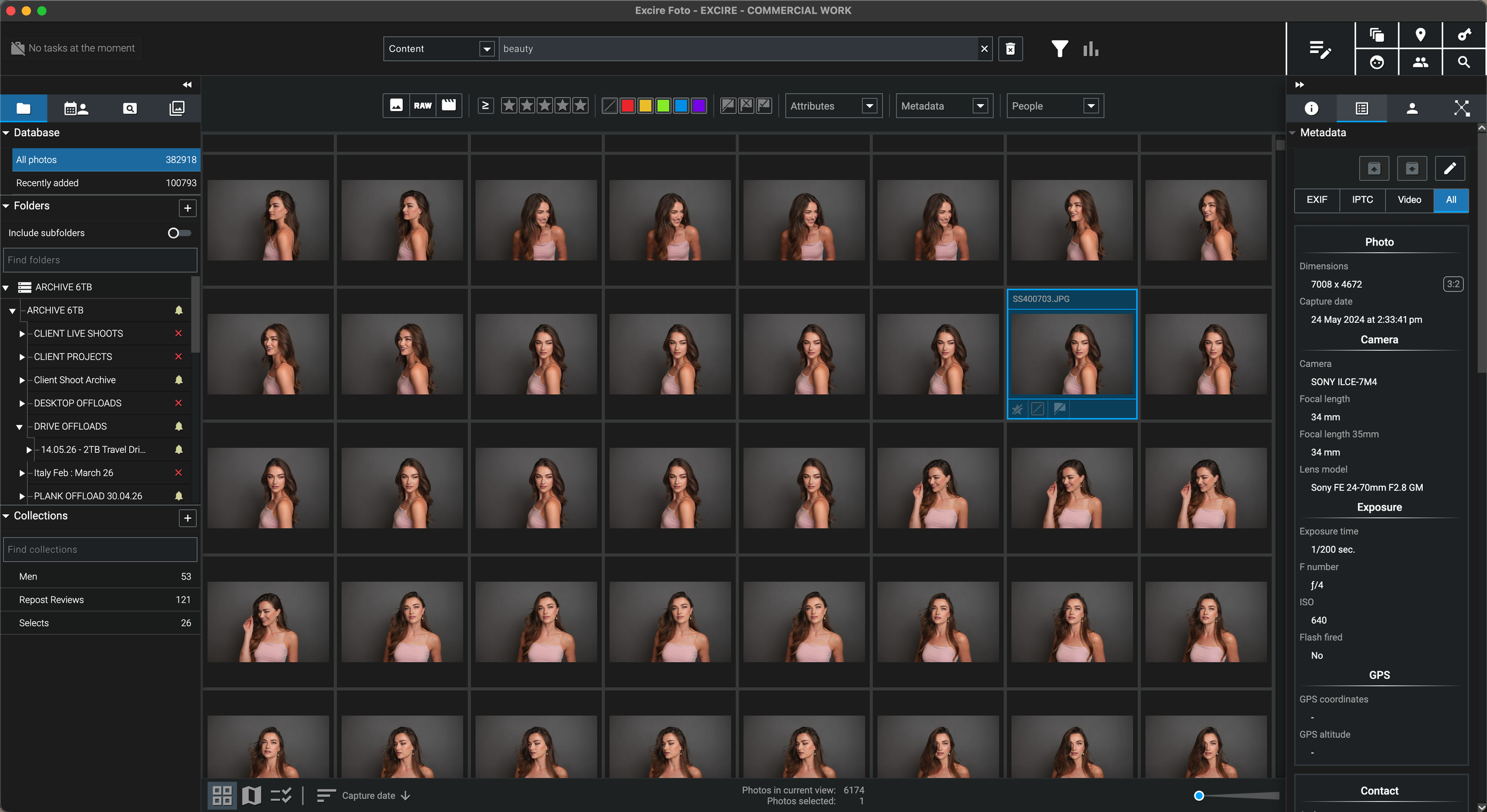
I can search visual content, people, metadata, visible text and descriptive ideas across a substantial professional catalogue while keeping the source photographs on storage I own and manage.
Why Local Processing Matters to Me
“My photography archive includes client commissions, unpublished images and decades of personal work. I want the search intelligence without giving up control of the files.”
I have worked as a professional photographer for more than 25 years across beauty, skincare, hair, commercial, editorial, portrait and travel photography. A large archive inevitably contains more than finished portfolio images. It also contains contact sheets, unused frames, client selections, unreleased work, personal photographs and original RAW files that were never intended for a public cloud library.
Before using Excire Foto, the difficulty was finding a practical way to add intelligent search to an archive spread across many external hard drives. I wanted to search what was visually inside an image without manually keywording every file and without uploading two or three million photographs to somebody else’s servers.
Excire Foto provides that middle ground. The software analyses photographs locally, creates a searchable database and keeps the original files in their existing folders. That makes it useful for photographers who value privacy, client confidentiality, physical ownership of their archive and the freedom to work without cloud-dependent image analysis.
How Local AI Photo Management Works
Excire does not need to transfer the image files to a cloud service to understand their visual content. The analysis and catalogue-building process takes place locally.
Catalogue photographs where they already live on your computer, working drives and long-term archive drives.
Excire uses the computer’s processor and local resources to generate image signatures, keywords, people information and searchable catalogue data.
Use descriptions, metadata, people, visual similarity, folders and filters without submitting the image collection to a remote AI service.
Browse indexed previews while an archive drive is offline, then reconnect it when the high-resolution source file is needed.
What Stays Local
Local processing is about more than avoiding cloud storage fees. It changes where the analysis happens and who retains physical control of the source material.
RAW files, JPEGs, TIFFs and supported videos remain in their existing folders on your computer, external drives or other locally accessible storage.
Excire’s analysis functions operate locally rather than sending image data to the cloud for content recognition.
Search for people and faces across portrait, wedding, family and commercial archives without uploading the photographs for remote facial analysis.
Previews, thumbnails, image signatures and catalogue information are held in the Excire database on storage you choose.
Once indexed, smaller previews and AI information can remain searchable while the source archive drive is disconnected.
Excire manages discovery and organisation; selected originals can then be opened in DxO PhotoLab, Capture One, Photoshop or another editor.
Local Does Not Mean Completely Offline Forever
This distinction is important. The image analysis is local, but the software still needs an internet connection periodically to confirm that the licence is valid.
Excire states that all analysis functions run locally and that no image data is uploaded to the cloud.
The software periodically contacts Excire’s licensing system to verify a valid licence. That is different from uploading your photo collection for processing.
Initial setup requires account access and activation before the purchased product can be used on the computer.
Excire is appropriate for photographers who want local AI and no image uploads, but not for a computer that can never connect to the internet at all.
Why Photographers Search for Local AI
The value of local AI becomes clearer when the archive contains client work, identifiable people, unpublished campaigns or sensitive personal photographs.
Keep unreleased campaigns, client selects, source files and alternative frames on storage controlled by the photographer.
Use face and people search without placing the complete identifiable image library into a consumer cloud platform.
Search years of travel and personal photography while retaining ownership of the originals and catalogue.
Build a long-term searchable index without making future access dependent on uploading the whole archive to a third-party service.
Performance and Storage
The privacy advantage of local processing also means the computer performs the work. Initial analysis of a very large archive can take time, and the catalogue needs suitable local storage.
Excire must inspect each supported file and generate the AI information required for future searches. Hundreds of thousands of images will not be analysed instantly.
Processor performance, memory, source-drive speed and catalogue storage all influence how quickly a large archive can be analysed and browsed.
A local SSD is the sensible place for the working catalogue and previews, even when the full-resolution originals remain on external archive drives.
Local control also means local responsibility. Maintain separate backups of the original image drives and the Excire database rather than treating one copy as sufficient.
Security Beyond the Software
Local processing removes the need to upload image data for analysis, but photographers still need sensible storage, access and backup practices.
Use account passwords, operating-system security and appropriate access controls, particularly when the catalogue contains confidential client work.
Local storage can still be lost or stolen. Encryption may be appropriate where contracts, client confidentiality or personal privacy require stronger protection.
A searchable catalogue is not a backup. Maintain independent copies of the original photographs and a recoverable copy of the Excire database.
Use the private catalogue to find the right images, then create controlled exports rather than exposing the complete source collection.
Updates can improve compatibility, reliability and security while preserving the local nature of the image analysis.
The advantage is independence and privacy; the trade-off is that you remain responsible for storage health, redundancy and recovery planning.
Practical Limitations
A privacy-focused local catalogue has clear benefits, but buyers should understand the processing, storage and collaboration trade-offs before purchasing.
The local computer must process the files, so the first import and AI analysis can be substantial when the archive contains hundreds of thousands of photographs.
The originals can remain external, but the database, thumbnails and selected preview quality require space on the catalogue drive.
Excire requires an online licence check approximately once every 30 days even though the photographs are analysed locally.
Teams needing simultaneous browser access, automated online delivery and enterprise permissions may require a different or additional system.
My Verdict
For my own archive, the combination of local AI, external-drive support, offline previews and descriptive search is far more important than placing the entire collection into another cloud ecosystem.
Continue Through the Excire Hub
Explore the complete Excire Foto hub or continue with a focused guide about archive storage, disconnected drives, large libraries, natural-language search or subscription-free photo management.
Local AI Photo Management FAQ
Local AI photo management software analyses and organises photographs using the computer itself rather than uploading the image collection to a remote server for content recognition. It can create searchable keywords, image signatures and people information while the originals remain on local or externally connected storage.
Excire states that all analysis functions run locally and that no image data is uploaded to the cloud. The photographs remain on storage controlled by the user.
The image analysis and catalogue search are local, but Excire requires internet access approximately once every 30 days to verify that the software licence is valid. It is therefore not intended for a computer that can never connect to the internet.
Excire states that all of its analysis functions run locally on the user’s computer. This includes the AI processes used to analyse and search image content and people without uploading the image data to the cloud.
Yes. Excire Foto can add and analyse supported photographs stored across external drives. After indexing, previews and catalogue information can remain searchable while a source drive is disconnected, although the drive must be reconnected to access the original high-resolution file.
No. Local processing prevents the need to upload images for analysis, but the photographer must still protect the computer, secure the drives and maintain independent backups of both the original photographs and the Excire database.
Performance depends on the computer, source-drive speed, file formats and size of the archive. Initial analysis of hundreds of thousands of photographs can take time because the work is performed by the local machine, but future searching uses the generated catalogue data.
No. Excire Foto is standalone photo and video management software. It catalogues and searches files stored on your own computer and accessible drives rather than providing online storage for the original image library.
Follow an Excire purchase button on this page and enter SIMONSONGHURST at checkout to receive 15% off eligible Excire software.
Save 15% on Excire Foto 2027
I use Excire Foto to search a catalogue of 382,918 photographs while keeping the original files and AI image analysis under local control.
Return to my complete professional workflow Explore the photography, retouching, editing and asset-management software that supports the way I work.
Visit the Workflow Hub
