Catalogue the folders you already have
Add photographs from your computer, external hard drives and organised archive folders without moving every original into a proprietary library.
A Lightroom-Free Photography Workflow
You do not need Lightroom to build a fast, searchable photography catalogue. Excire Foto provides standalone photo management for photographers who want to organise, preview and find their images independently of the software they use for RAW processing and retouching.
I use Excire Foto to manage a working catalogue of 382,918 photographs while continuing to choose the most appropriate editor for each job. My original files remain across my computer and external archive drives; Excire gives me the visual catalogue, AI search and organisation layer that sits before the editing stage.
Save 15% using my affiliate discount code:
This page contains affiliate links. I may earn a commission if you purchase through my link, at no additional cost to you. Use code SIMONSONGHURST for 15% off eligible Excire software.
A Real Standalone Photography Catalogue
This is my current Excire Foto catalogue. It contains beauty, commercial, portrait, travel and personal work stored across my computer and numerous external drives, while my image-editing choices remain completely separate.
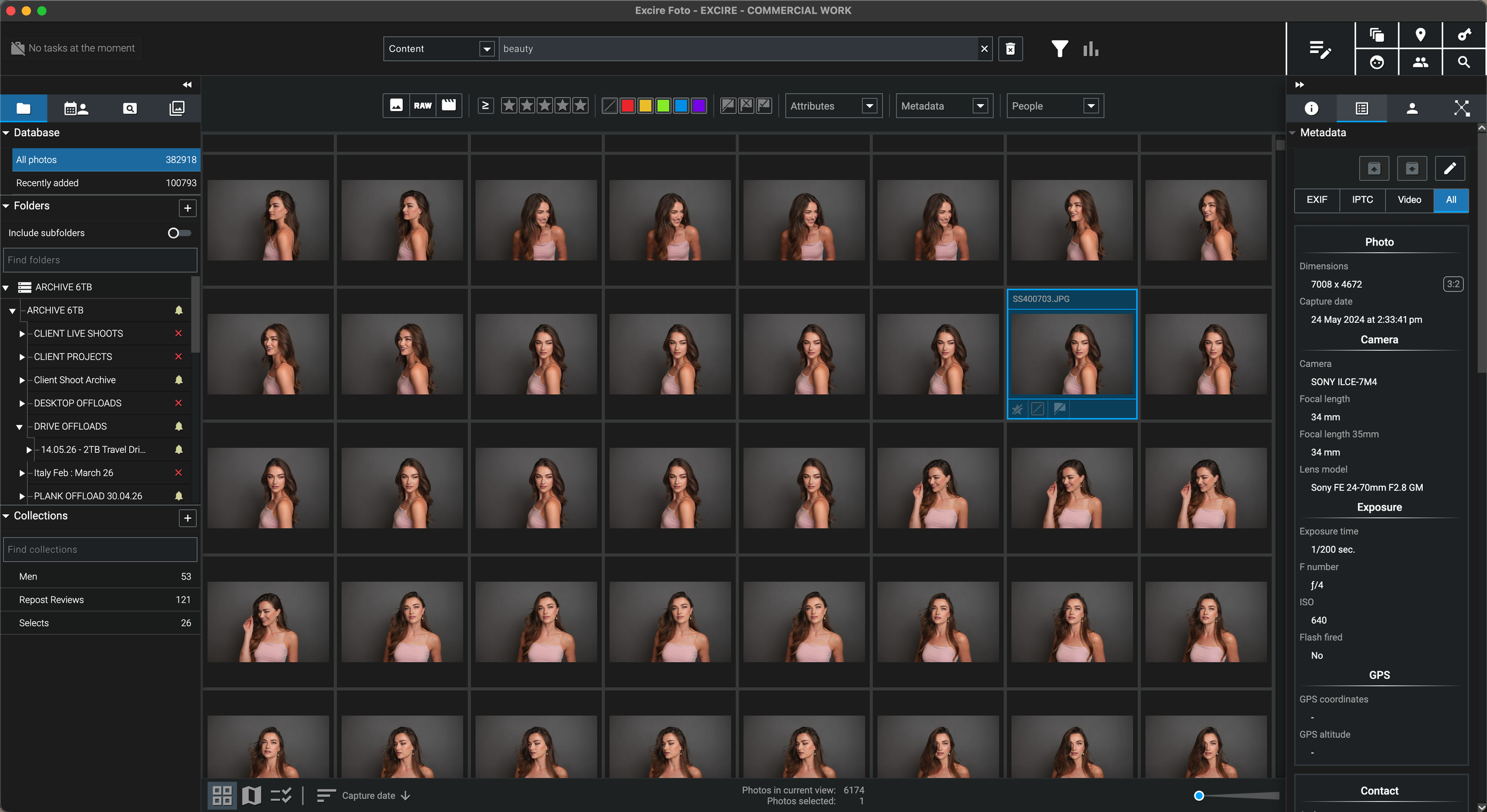
Excire helps me locate, filter and organise the right photograph first. Once I have found the original, I can open it in the editor I want to use rather than being locked into one all-purpose ecosystem.
Why I Wanted a Standalone Photo Manager
“My archive-management problem existed regardless of which software I used to edit the photographs.”
I have worked as a professional photographer for more than 25 years across beauty, skincare, hair, commercial, editorial, portrait and travel photography. During that time, editing applications have changed, computers have been replaced and finished jobs have moved onto many generations of external hard drives.
The enduring problem was not simply how to process a RAW file. It was how to find the right photograph across an archive that I estimate contains between two and three million images without depending on one editing application, one catalogue format or my memory of an old folder name.
Excire Foto appealed to me because it is a standalone photo and video manager. It can catalogue the originals where they already live, create searchable previews and AI information, and then hand the chosen file to another application for editing.
That separation is important. I can use Excire for archive discovery and organisation, then use DxO PhotoLab, Capture One, Photoshop, Affinity Photo, Luminar Neo or another suitable editor when I reach the processing stage.
The Core Idea
Excire Foto is designed as a standalone management layer. It helps you discover and organise the file before passing the original into your preferred image-editing workflow.
Add photographs from your computer, external hard drives and organised archive folders without moving every original into a proprietary library.
Use previews, metadata, ratings, folders, AI descriptions, people and visual similarity to locate the photographs relevant to the job.
Use the Open With command or reveal the source file, then process it in the RAW editor or retouching application that suits your workflow.
Keep the edited file within your established folder structure and refresh the relevant preview or folder when you want the new version visible in Excire.
What to Look For
Photographers who already have an editor do not necessarily need another editing suite. They need a reliable way to see, search and retrieve work across a growing collection.
Build a searchable photography database without importing the archive into a Lightroom Classic catalogue or adopting a Lightroom-based editing workflow.
Catalogue photographs where they already live rather than copying every RAW file onto the internal storage of your computer.
Search the catalogue first and reconnect the relevant archive drive only when you need the original high-resolution photograph.
Search by visual content, people, faces, visible text, metadata and descriptive phrases across a large local photo library.
Use Excire for management and retrieval, then continue into DxO PhotoLab, Capture One, Photoshop or another editing application.
Make selected ratings, labels, keywords and metadata available outside the Excire database when your wider workflow requires it.
A Flexible Editing Workflow
This page is not about choosing one editor over another. The value is being able to maintain one consistent archive-management system while your processing tools vary by camera, client or creative requirement.
Locate the original in Excire, then open it in software such as DxO PhotoLab or Capture One when you need detailed RAW processing, lens corrections or colour work.
Send a selected photograph into a pixel editor for compositing, retouching, cleanup or layered creative work without making that application responsible for the whole archive.
A standalone catalogue lets you use different finishing tools, plugins and AI applications while maintaining one central route back to the original files.
Because Excire handles catalogue management separately, changing your preferred editor does not have to mean abandoning the system used to find and organise decades of work.
Metadata and XMP Explained
This is an important workflow detail. Excire’s automatically assigned information is initially part of its own database; it does not instantly appear inside every other application.
AI keywords, ratings and metadata changes are initially maintained within the Excire Foto database.
Use Excire’s Save Metadata command when you want compatible information available to other applications.
For proprietary RAW formats, metadata is stored in an accompanying XMP file rather than written directly into the original RAW file.
When two programs exchange keywords, ratings or labels, align their metadata and sidecar preferences before applying the workflow to a large archive.
A Lightroom-Free Archive in Practice
Separating management from editing works best when the storage, catalogue and finished-output stages each have a clearly defined role.
Maintain clear year, client, project or location folders on appropriately named drives so the archive remains understandable outside any application.
Analyse the folders, retain previews and use AI, metadata, collections and filters to locate work across connected and disconnected storage.
Open only the required files in the application best suited to the job rather than forcing every image through one editor.
Store final TIFF, JPEG or other deliverables inside a predictable project structure, then update the folder or rebuild previews when needed.
Who This Approach Is For
The strongest buyer is not necessarily looking for another creative editor. They are looking for a better way to manage the photographs that feed into the tools they already use.
Use Excire to find and organise the original, then continue into DxO PhotoLab for optical corrections and RAW development.
Use a standalone AI catalogue alongside existing sessions, catalogues and external folders, with carefully configured metadata exchange where needed.
Locate older campaigns, portraits and source material in Excire before opening the required photograph for detailed pixel editing.
Maintain a consistent management layer even when different cameras, clients or deliverables require different processing applications.
Browse indexed previews across archive storage and reconnect the correct drive only when the original high-resolution file is required.
Use a one-time-purchase photo-management application rather than adopting a recurring Lightroom subscription simply to obtain a catalogue.
Practical Limitations
Excire does not magically synchronise every change made inside every editing application. Understanding where originals, metadata and finished files live will prevent confusion.
You still need separate software for exposure adjustments, colour work, retouching, layers and final image processing.
When another program changes or exports a file on disk, refresh the folder or rebuild the relevant preview to show the new appearance in Excire.
Save the information from Excire and align XMP preferences when you want another application to read ratings, labels or keywords.
Offline previews can be searched while a drive is disconnected, but editing or exporting the original requires that storage to be available again.
My Verdict
It separates the long-term archive from the changing choice of editing software. That makes particular sense for photographers with large collections, external drives and established processing tools.
Continue Through the Excire Hub
Explore the complete Excire Foto hub or continue with a focused guide about external hard drives, AI search, professional archives, local processing or one-time-purchase software.
Photo Management Without Lightroom FAQ
Yes. A standalone photo-management application can catalogue folders stored on your computer and external drives, create previews, apply metadata and provide search tools without requiring a Lightroom Classic catalogue.
No. Excire Foto is primarily photo and video management software. It helps you organise, search, filter and select photographs; you then use your preferred RAW editor or retouching application for image processing.
Yes. You can use Excire to locate and organise an original photograph, then open or reveal that file for processing in DxO PhotoLab. Excire and DxO perform different parts of the workflow: catalogue management and RAW development.
Yes. Excire can be used as a standalone AI catalogue alongside Capture One. When exchanging metadata, configure the relevant XMP and sidecar settings in both applications and test the workflow before applying it across a large archive.
Excire provides an Open With workflow for supported external applications. You can also reveal the original file in the operating system and open it in the editor of your choice.
Not automatically. Excire initially stores its assigned keywords and metadata inside its own database. Use Save Metadata to write compatible information to the image or an XMP sidecar when you want other applications to read it.
Once the folders have been added and analysed, catalogue previews and AI information can remain available while a drive is offline. Reconnect the appropriate drive when you need to edit, export or otherwise access the original high-resolution file.
Excire Foto 2027 is sold as a one-time software purchase rather than a compulsory monthly or annual subscription for continued use of the purchased version.
Follow an Excire purchase button on this page and enter SIMONSONGHURST at checkout to receive 15% off eligible Excire software.
Save 15% on Excire Foto 2027
I use Excire Foto to manage 382,918 photographs while retaining the freedom to process each selected original in the editing software best suited to the job.
Return to my complete professional workflow Explore the photography, retouching, editing and asset-management software that supports the way I work.
Visit the Workflow Hub
